The App Won't Open. First, Don't Make It Worse.
You open your bank app to move money or check a balance, and it spins, errors out, or asks you to sign in again. That's unsettling—especially when a bill is due or you just sent a payment. The safest first move is boring but useful: pause before you tap Pay again.
When we checked Google Trends in the US on November 16, 2026, “bank outage” was listed among the past day's trends with 1M+ searches. That's a search-volume band, not an outage report: it doesn't identify a bank, confirm which services are affected, or explain why. It does explain why people may be looking for a calm answer right now. See Google Trends.
This guide is for the moment when banking access is uncertain. It won't diagnose a particular bank's systems. Instead, it helps you check safely, avoid a duplicate payment, and reach the bank without handing your details to a fake support account.
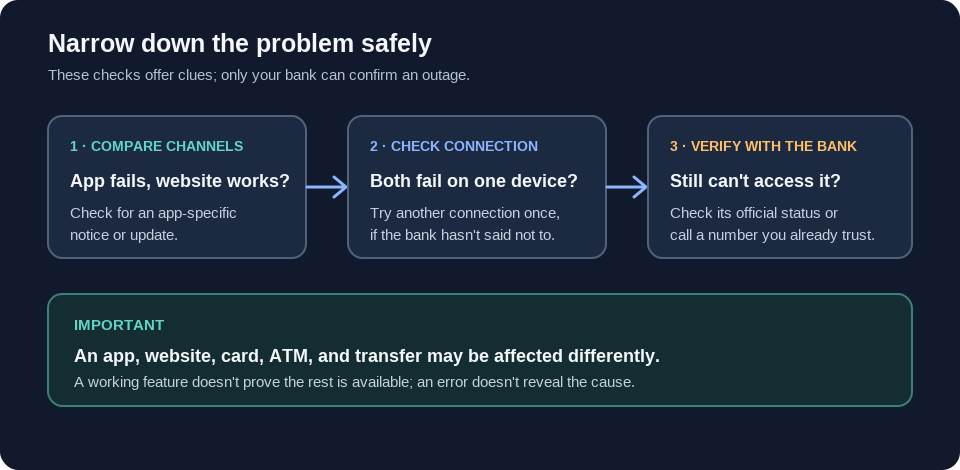
A few low-risk checks can narrow down what is failing. They cannot confirm an outage; the bank is the source for that.
Check What's Actually Unavailable
An app error is a symptom, not a diagnosis. It could be a short service interruption, a connection problem, maintenance, an app update, or an account check that needs the bank's attention. Don't infer the cause from one screen.
Try this in order:
- Look for a notice from the bank. Use the bank's official app if it opens, a bookmark you already trust, or the bank's address typed into your browser. Check its service-status or help page. A post from an account you haven't verified is not confirmation.
- Compare one other official route. If the app fails, try the bank's website. If the website fails too, try again on a different connection when convenient. Don't keep cycling through networks or devices if the bank has warned customers not to retry.
- Notice what still works. A card payment, ATM withdrawal, transfer, and sign-in can rely on different services. One working feature doesn't prove everything is fine; one failed feature doesn't prove your whole account is locked.
- Stop if the message looks account-specific. A fraud alert, password reset, or identity check may need a response even if other customers are reporting trouble. Contact the bank directly through a known channel.
Searches and outage-reporting websites can tell you other people are seeing errors, but they are not the bank's status page. Don't use them to follow support links, confirm a transaction, or share account information.
If a Payment Is Stuck, Check Before You Retry
This is the part that can save you real hassle. If a transfer, bill payment, or card action appeared to freeze, don't submit the same instruction again just because the confirmation screen didn't load. First see whether the bank recorded it.
Use the bank's official transaction history or payment-status page if available. Write down the amount, recipient, time, and any reference number. If the status says pending—or there is no clear status—ask the bank before trying again. Pending does not guarantee a particular outcome or release time.
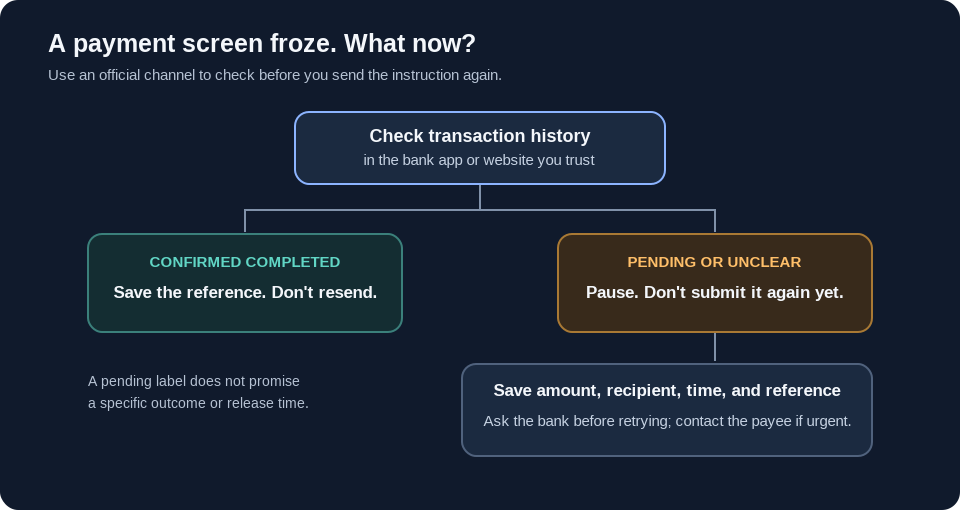
When you can't confirm what happened, pause and verify through the bank instead of creating a second payment.
If a bill is time-sensitive, contact the payee using a number, email, or portal you already know is theirs. Explain that your bank is unavailable and ask about the deadline or another way to confirm receipt. Avoid a new payment link sent unexpectedly by text or email.
Keep a note or screenshot of the error and the time it happened. Before sharing anything with support, hide your full account number, card number, balance, address, and any security code. A reference number and a short description are usually a safer starting point.
Keep Fake “Outage Support” Away From Your Account
When people are worried, a convincing message can look like help: “We know the app is down—verify your account here.” It may arrive by text, email, search ad, or social media reply. The timing doesn't make it genuine.
- Don't sign in from an unexpected outage link. Open the app, use your saved bookmark, type the known website address, or call the number on your card or statement.
- Don't tell anyone your password, card PIN, or one-time sign-in code—not a person in a direct message, and not someone who says they are “checking your identity.”
- Don't install a remote-access app or let a stranger control your screen to “fix” your banking app.
- Be wary of sponsored search results and accounts that appear in replies to an outage announcement. Find contact details independently.
A genuine service interruption can be a useful opening for a scammer, but the two aren't proof of each other. Treat an unexpected message as unverified and check through a channel you chose yourself. Our guide to spotting phishing messages covers the same pause-and-verify habit.
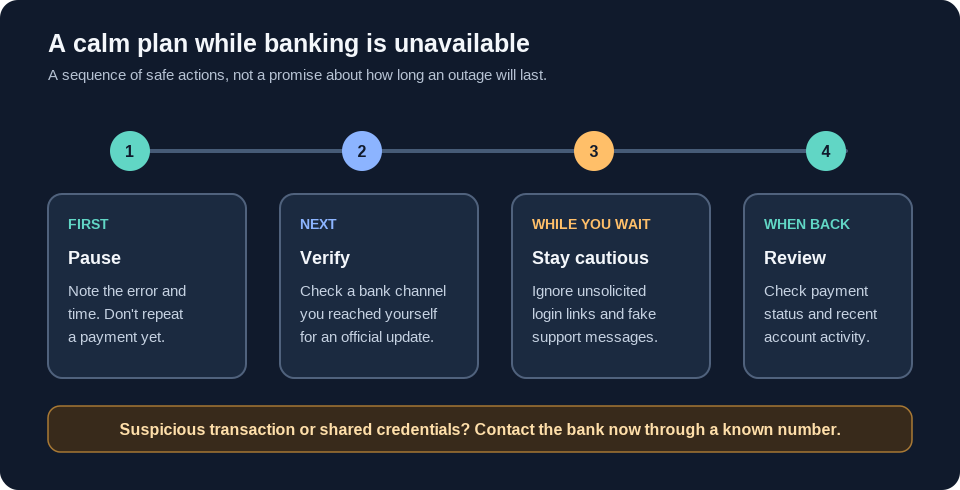
You don't need to solve the outage yourself. The goal is to protect your account and keep a clear record while the bank investigates.
When You Should Contact the Bank Now
If all you have is a temporary error and no urgent transaction, it may be reasonable to wait for the bank's official update and try again later. But don't wait on a possible account-security problem.
Call the number printed on your card or statement, or use contact details from the bank's official website that you reached independently, if:
- You see a transaction you don't recognize.
- You shared your password, card details, or a one-time code with someone.
- You received a login approval request you didn't start.
- Your card is missing, or a payment appears to have gone to the wrong person.
- You need the bank to confirm a payment before a deadline.
Tell the bank what happened and when, and follow its instructions. If you entered credentials on a suspicious page, say so plainly; don't wait to see whether anything else happens. Change your password only through the bank's official site or app, and review recent activity once you can sign in. If you reuse that password elsewhere, change it there too. Our password guide explains how to make each account's password unique.
When Access Comes Back
Wait for the bank's own update if it has given one. Then sign in using the app or website you normally trust and check:
- Whether the payment or transfer is completed, pending, failed, or absent.
- Whether the account activity includes anything you don't recognize.
- Whether a notice asks you to take an action through the bank's regular sign-in flow.
If a transaction still has an unclear status, or money is missing, contact the bank rather than guessing or sending it again. Keep your notes and any reference numbers until the issue is resolved.
You don't need to reinstall the app, reset every password, or change account settings just because a service had trouble. If the bank's official guidance recommends an update or another specific step, follow that guidance. Otherwise, avoid making rushed changes based on a pop-up, a search result, or a message from an account you can't verify.
A Small Plan for Next Time
Outages are easier to handle when you don't have to hunt for the real support number under pressure. Save the bank's official website as a bookmark and keep your card or statement somewhere you can find it. If you use a password manager, make sure you know how to reach it if your phone is unavailable. For a bill with a strict deadline, note the payee's trusted contact method before the deadline day.
The short version: verify through the bank, don't repeat an uncertain payment, and never hand a password or one-time code to “support.” An error screen can wait a moment. A suspicious transaction or a request for your credentials should not.