Executive Summary: Pick a Protocol for a Job, Not a Slogan
VPN protocol names are often presented as speed rankings or security badges. That is too simple. A protocol defines how devices establish a tunnel, authenticate peers, protect packets, recover from network changes, and interact with the underlying network. The service that implements it also makes important choices: server architecture, cryptographic configuration, DNS handling, logging, account design, kill switch behavior, and what happens when a connection fails.
The practical shortlist for ordinary consumer VPN use is small:
- WireGuard is a modern, compact protocol with strong performance on many current devices. It usually uses UDP and does not include built-in obfuscation. Provider implementation matters, especially for safely managing client endpoint information.
- OpenVPN is mature, widely deployed, configurable, and available over UDP or TCP. Its flexibility and broad ecosystem are useful, though it can consume more resources and its TCP mode has performance trade-offs.
- IKEv2/IPsec is a family of cooperating protocols commonly integrated into operating systems and enterprise gateways. It can reconnect smoothly across network changes, but NAT traversal and network filtering vary.
- Provider-specific protocols such as NordLynx and Lightway adapt familiar design ideas into a provider's own client/server system. They may be convenient and fast, but interoperability, auditability, and configuration portability differ.
- Obfuscation modes are additional methods intended to make a VPN connection less recognizable to some network filters. They are not a universal standard or a guarantee of access, privacy, or safety.
Older names still appear in device menus and hosting guides:
- L2TP is a tunnel protocol, not encryption by itself. L2TP/IPsec is a legacy combination.
- PPTP is obsolete for security-sensitive use and should not be selected.
- SSTP is associated with Microsoft's ecosystem and can suit specific Windows-centric deployments; it is not a broadly interoperable consumer default.
- SoftEther, OpenConnect, and SSH tunnels solve adjacent or specialized connection problems. Whether they are a fit depends on deployment, administration, and trust.
- Shadowsocks is a proxy designed for traffic forwarding and circumvention contexts, not a complete general-purpose IP VPN. Tor is a separate anonymity network, not a VPN protocol.
For an everyday paid VPN, choose a reputable service with a maintained WireGuard-based option or OpenVPN, apps you trust, and independently reviewable privacy claims. A privacy-focused paid example is Mullvad for WireGuard; IVPN offers WireGuard and OpenVPN on supported platforms; Proton VPN offers a mainstream free tier and paid options, with available protocols varying by app and plan. Windscribe can be considered when a limited free plan and connection options are useful. These are starting points to investigate, not guarantees or endorsements for every country, device, or threat model.
For a free VPN, treat the business model and limits as part of the security decision. A no-cost plan from an established paid provider is generally easier to evaluate than an anonymous “unlimited” app. But free-tier access does not automatically include every paid protocol, server location, or circumvention feature. We do not recommend free PPTP, random public VPN endpoints, or a service whose operator and logging practices are unclear.
If your concern is government censorship, a school or workplace filter, or another restriction, separate technical capability from permission, law, safety, and risk. VPNs are blocked in some places and regulated in others. Obfuscation may help some connections pass some filters, but no provider can honestly guarantee invisibility or access. If use could put you or someone else in danger, seek current, trusted safety guidance before connecting.
Quick Comparison Chart
This is a qualitative engineering comparison, not a benchmark. The ratings describe common tendencies of mature implementations on reasonably current equipment; they do not predict the speed of a particular provider or route. High means a generally favorable tendency for that row, not “best overall.” Obfuscation and provider implementations vary especially widely.
| Protocol or family | Typical speed potential | Device resource use | Network roaming | NAT/firewall compatibility | Obfuscation built in | Configuration and ecosystem | Best-fit examples |
|---|---|---|---|---|---|---|---|
| WireGuard | High | Low | Good, implementation-dependent | Moderate; UDP can be blocked | No | Simple core; client/server setup matters | Daily use, modern devices, site-to-site |
| OpenVPN over UDP | High to medium-high | Medium | Good with a well-designed client | Moderate | No | Very broad; many tuning options | Compatibility, remote access, configurable deployments |
| OpenVPN over TCP | Medium to low under loss | Medium-high | Good with reconnect logic | Often more likely to pass restrictive networks, not guaranteed | No | Broad, but transport choice has trade-offs | Networks that allow TCP but restrict UDP; fallback |
| IKEv2/IPsec | High | Low to medium | Often very good | Can be affected by NAT and UDP filtering | No | Built into many systems; policy complexity | Managed devices, mobile network changes |
| L2TP/IPsec | Medium to low | Medium | Fair | Can be awkward behind NAT and filters | No | Legacy OS support | Interoperating with old equipment only |
| PPTP | Not a useful security comparison | Low | Fair | Often easy to pass, but irrelevant to safety | No | Legacy only | Migration testing; do not use for protection |
| SSTP | Medium; implementation-dependent | Medium | Good with reconnect support | Can work on some TCP-only networks | No formal obfuscation claim | Windows-centric ecosystem | Specific Microsoft/Windows environments |
| SoftEther | Medium to high; varies by mode | Medium | Depends on client/config | Multiple transport options | Some modes can resemble common traffic; not a guarantee | Flexible, self-hosted/administrative | Lab, multi-protocol gateway, managed remote access |
| OpenConnect / AnyConnect-compatible | Medium to high; varies | Medium | Good with supported clients | Often designed for remote access through managed networks | Not inherently stealth | Enterprise-oriented | Corporate VPN interoperability |
| NordLynx / Lightway | High potential | Low to medium | Good; implementation-dependent | Depends on provider transport | Separate options may exist | Provider-specific | Convenience inside that provider's apps |
| Obfuscation wrappers / “Stealth” modes | Variable; may be slower | Medium to high | Variable | Intended to improve compatibility on some filtered networks | Yes, by design | Provider and network specific | Authorized access where ordinary VPN traffic is blocked |
| Shadowsocks | High potential as a proxy | Low to medium | Client-dependent | Can work on some filtered networks | Designed for proxy/circumvention, not a universal disguise | Proxy ecosystem; not a full IP VPN | Application proxying and approved circumvention use |
| Tor | Usually much slower than direct access | Medium to high | Circuit-based, not VPN roaming | Bridges/transports can help in some cases | Separate anonymity/circumvention design | Browser/network ecosystem | Reducing reliance on one VPN provider; anonymity goals |
How to read a performance comparison responsibly
A provider's measured throughput depends on far more than the protocol: the access connection, server location, server load, peering, routing, device CPU, VPN app, tunnel MTU, packet size, destination server, and time of day. A nearby WireGuard server on a low-powered router may be slower than OpenVPN on a desktop with hardware acceleration and a better route. One protocol may feel faster for video calls because it reconnects promptly, even if a large download benchmark ranks it differently.
This guide does not claim to have run a controlled protocol benchmark. The table is about design tendencies. To compare providers in a way that means something, test the same device, same network, nearby server, destination, time window, and protocol settings; record repeated runs and the un-tunneled baseline. Measure latency, jitter, loss, upload, download, reconnection time, and battery or CPU impact. Do not infer anonymity, privacy, or censorship resistance from a speed result.
1. What a VPN Tunnel Is
The phrase “virtual private network” covers several designs. At its simplest, a VPN client creates a virtual network interface. The operating system routes selected traffic to that interface. The VPN encapsulates those packets inside another packet, protects the encapsulated data, and sends it to a VPN gateway. The gateway validates and removes the outer wrapper, then forwards permitted traffic to its destination.
In a consumer “full tunnel,” most device internet traffic is routed through the provider's gateway. In a split tunnel, only selected routes or applications use the VPN. In a site-to-site VPN, two networks connect to each other. In a remote-access VPN, a person connects a device to an organization's network. These use cases may share a protocol but have different identity, routing, access-control, and logging requirements.
Imagine placing a letter inside an addressed, locked courier bag. The courier can see where the bag travels and who sent it; the recipient opens the inner letter. A VPN is more complicated because it handles IP packets, both ends must authenticate, return traffic needs routes, and the outer packet itself can expose metadata. But the analogy captures one essential point: encryption protects the inner content from some observers, while the tunnel operator still handles the traffic.
The layers involved
A VPN connection typically combines:
- A tunnel mechanism: how inner packets are carried inside outer packets.
- A key exchange and authentication method: how peers establish keys and confirm identity.
- Encryption and integrity protection: how packet contents are made confidential and protected against modification.
- A transport: often UDP or TCP, or an IP-layer mechanism such as IPsec ESP.
- Routing and policy: which traffic enters the tunnel, where it exits, and what network access is permitted.
- Operational controls: DNS, kill switch, reconnect behavior, server state, logs, client updates, and account security.
Some protocol names refer to a complete VPN protocol; others refer to only one layer or a vendor's bundled implementation. Comparing “IKEv2” directly to “AES-256” is like comparing a delivery system to a lock: one is not a substitute for the other. The cipher is only one component of a security system.
What an observer can and cannot see
Without a tunnel, the local Wi-Fi operator or internet service provider may see device traffic metadata and, depending on DNS and application encryption, some destinations or content. With a correctly operating full-tunnel VPN, the local network usually sees an encrypted connection to the VPN server, timing and volume, and the endpoint IP address of that server. The VPN provider may see the source IP, connection times, and destinations or DNS queries depending on architecture and protections. Websites still see the VPN exit IP and can identify logged-in users or track browsers.
TLS/HTTPS remains important inside a VPN. A VPN does not replace HTTPS and does not make an untrusted website trustworthy. The VPN provider can observe more than the café Wi-Fi can, but HTTPS still protects application traffic between your browser and the website from the VPN provider. DNS, metadata, account identity, app telemetry, and endpoint compromise remain separate concerns.
What a VPN does not promise
A VPN protocol alone does not guarantee:
- That a provider keeps no records or cannot correlate sessions.
- That a VPN app sends all traffic through the tunnel.
- That DNS, IPv6, or local-network traffic cannot leak.
- That the VPN's servers are operated by the company whose logo appears in the app.
- That the service cannot be blocked or detected.
- That an account cannot identify you.
- That traffic leaving the VPN server is encrypted to its destination.
- That the provider's software is free of vulnerabilities.
- That the VPN is lawful in every location or permitted by every network owner.
These are properties of a complete service, device, and context—not a label on a protocol menu.
2. A Short Vocabulary Before Comparing Protocols
Encapsulation
Encapsulation wraps one network packet inside another. The inner packet is what the VPN is carrying; the outer packet travels across the public or local network. The wrapper adds bytes, and those bytes consume bandwidth and may affect packet size limits. Every tunnel has some overhead, but the exact amount depends on protocol options and network path.
Handshake and session keys
A handshake authenticates peers and establishes fresh cryptographic keys. A session key protects traffic after setup. Protocols differ in how they authenticate servers, clients, and devices; how often keys rotate; how they handle reconnects; and what metadata they expose during connection establishment.
Forward secrecy
Forward secrecy is a key-exchange property intended to limit the damage if a long-term key is later compromised: past sessions should not become decryptable merely because that long-term key is exposed. It depends on the protocol configuration, implementation, and key management. The phrase is not a synonym for “the provider cannot log me.”
UDP and TCP
UDP is a connectionless transport. It avoids some transport-level retransmission and ordering behavior, which can suit a tunnel that already handles packet loss. TCP creates an ordered byte stream with retransmissions. TCP can be useful where networks block UDP, but placing a TCP tunnel inside TCP application connections can cause “TCP-over-TCP” performance problems during loss because both layers retry and queue data.
NAT traversal
Network address translation (NAT) lets many devices share a public address. Many home routers, mobile networks, and public Wi-Fi use NAT. A VPN must send traffic through these devices and maintain a return path. NAT traversal mechanisms can improve compatibility but may use recognizable ports or require additional exchanges. “Works through NAT” does not mean “works through every firewall.”
MTU and fragmentation
The maximum transmission unit (MTU) is the largest packet a network link can carry without fragmentation. Tunnels add overhead, so a packet that fit before encapsulation may exceed the path MTU after wrapping. Fragmentation or packet loss can create slow-loading sites, broken file transfers, or inconsistent app behavior. Lowering tunnel MTU can help in specific environments but should be diagnosed rather than guessed.
Full tunnel, split tunnel, and kill switch
A full tunnel routes all eligible internet traffic through the VPN. A split tunnel routes only selected applications, addresses, or subnets. A kill switch blocks traffic when a tunnel unexpectedly drops; the exact scope differs among apps and operating systems. A kill switch should be tested, not assumed. The operating system may create exceptions for local-network access, DNS, captive portals, or emergency services.
Obfuscation
Obfuscation attempts to make VPN traffic less recognizable to a network filter. It is not the same thing as stronger encryption, and it is not necessarily anonymity. Methods can change packet patterns, wrap traffic in another transport, or use a provider-specific handshake. A network can still block endpoints, analyze traffic patterns, or require identity-based access. Obfuscation features may be fragile, slower, or unavailable on some devices.
3. WireGuard
WireGuard is a modern VPN protocol designed around a compact codebase, a small set of cryptographic choices, and a straightforward peer model. Its official documentation describes a Noise-based handshake and encrypted data packets carried over UDP. It is integrated into the Linux kernel and has implementations for other major platforms. Read the project's protocol page and technical paper for exact details and limits.
How WireGuard works at a high level
Each peer has a public/private key pair. Configurations associate public keys with allowed IP ranges and endpoints. A handshake authenticates a peer and derives symmetric keys; data packets are encrypted and authenticated. The protocol uses a small fixed suite rather than offering a menu of cipher combinations. This design can make the protocol easier to audit and deploy consistently, but a VPN provider still has to build server management, authentication, account mapping, DNS handling, and privacy controls around it.
WireGuard's design supports roaming: a peer can move to a new network and the endpoint address can be updated based on authenticated traffic. This is useful when a phone switches between Wi-Fi and mobile data. The protocol is connectionless over UDP, so it does not preserve the same kind of TCP session state as some other systems; the application or client manages connectivity and keepalive behavior.
Strengths
- A relatively small protocol design and codebase compared with highly configurable legacy stacks.
- Strong performance on many modern devices, especially where a kernel implementation is available.
- Low resource use can be beneficial on phones, laptops, and some routers.
- Modern cryptographic primitives with a deliberately limited set of negotiation choices.
- Fast handshakes and useful roaming behavior in many implementations.
- Good fit for personal devices, site-to-site links, and self-managed infrastructure when keys and routes are operated carefully.
Trade-offs and privacy details
WireGuard is not designed to disguise itself. Standard WireGuard traffic uses UDP and can be identified or blocked by network policy or traffic inspection. The official project explicitly treats obfuscation as a layer above the protocol, not an intrinsic feature.
The peer model also has operational implications. A server needs an endpoint address associated with a peer while that peer is communicating. An implementation may retain endpoint information in memory or configuration. This does not require logging browsing activity, but provider systems must decide how to provision keys, map users to peers, remove stale state, and handle account revocation. Ask the provider how it handles those lifecycle details rather than assuming the protocol settles the question.
WireGuard generally does not use username/password authentication as its core peer mechanism. Consumer apps often hide key generation and rotation behind an account login. That is convenient but means the app and service control plane remain important. Secure the account with a unique password and multifactor authentication where available.
Performance and compatibility
WireGuard often performs very well, but a protocol's benchmark does not capture the quality of a provider's servers or peering. A CPU-limited router may saturate its processor before it saturates a fiber connection. A distant server can add substantial latency regardless of cryptographic speed. A mobile OS may suspend an app or restrict background networking. Those effects can dominate.
WireGuard is not natively TCP-based. A provider can add a separate transport or obfuscation layer, but that is an implementation feature, not ordinary WireGuard itself. If UDP is blocked, do not assume the protocol's speed will matter; try a documented alternate method permitted by the network owner.
When WireGuard is a good choice
- Everyday browsing and streaming through a reputable consumer VPN.
- A phone that regularly changes between trusted Wi-Fi and mobile networks.
- Personal remote access between devices you administer.
- Site-to-site connections where both sides support it and key rotation is managed.
- A privacy-sensitive service that documents how it handles peer endpoint state and client keys.
When another option may fit better
- A network specifically blocks or disrupts WireGuard UDP.
- An organization needs a mature, highly configurable certificate-based remote-access ecosystem.
- A managed device requires a standard supported by its gateway and administrator.
- You need protocol interoperability with an existing IPsec or OpenVPN deployment.
- You need traffic camouflage; standard WireGuard is not a stealth protocol.
Provider examples
Free: Proton VPN is a sensible mainstream free starting point when its current free tier, supported device, and available app protocol match your needs. Free plans change, and protocol choice may be automatic or restricted by platform. Windscribe is another free-tier option to compare if its current data allowance and protocol choices suit you.
Paid: Mullvad is a privacy-oriented paid provider whose apps use WireGuard; IVPN and Proton VPN also offer WireGuard options. Compare account requirements, device support, privacy documentation, server availability, and the actual app—not just the protocol. The existing VPN provider comparison has a broader service-level discussion.
For self-hosting, the official WireGuard site and wireguard-tools repository are primary resources. Self-hosting changes the trust model; it does not automatically provide anonymity or censorship resistance.
4. OpenVPN
OpenVPN is an open-source VPN system with a long deployment history. It uses TLS-based control-channel mechanisms to authenticate and negotiate, then protects tunnel data using configured data-channel cryptography. It can operate over UDP or TCP and supports a wide range of configuration and authentication options.
The name refers both to the protocol and to the software ecosystem. A provider may offer OpenVPN through its own app, standard configuration files, or third-party clients. The settings it exposes—transport, cipher, certificate validation, authentication, routes, DNS, and management hooks—can differ substantially.
UDP mode
OpenVPN over UDP is a common performance-oriented setup. UDP avoids the retransmission behavior of an outer TCP connection and often gives a better balance for interactive applications and file transfers. It still has packet overhead and may be blocked by restrictive networks. A UDP port number alone does not make traffic invisible.
TCP mode
OpenVPN over TCP can connect from networks that allow only selected TCP traffic, but it is not inherently stealthy. If the VPN TCP stream carries application TCP streams, packet loss can cause retransmissions and head-of-line blocking at multiple layers. This can make the connection feel slow or erratic, especially when the path is lossy. TCP mode is a compatibility fallback, not a universal “stronger” setting.
Strengths
- Mature, broad ecosystem and extensive deployment experience.
- Flexible authentication, certificates, routing, and server configuration.
- UDP and TCP options can suit different network conditions.
- Broad support in commercial VPN services and self-hosted/enterprise deployments.
- Open-source implementations and a large body of troubleshooting material.
- Useful where an administrator needs granular configuration and compatibility.
Trade-offs
- Larger and more configurable code and deployment surface than WireGuard.
- More options create more opportunities for inconsistent or unsafe configuration.
- Performance and battery use can be less favorable than a well-optimized WireGuard implementation, especially on constrained hardware; this is not universal.
- TCP mode may perform poorly under loss and is not automatically difficult to detect.
- TLS, certificate, cipher, and server settings require responsible maintenance.
When OpenVPN is a good choice
- You need a widely supported configuration format or third-party client.
- You administer a remote-access gateway and need certificate or username-based controls.
- A particular device, router, or provider has better OpenVPN support than WireGuard.
- You need a provider-supported alternate transport, with the understanding that it may not work everywhere.
- You need to troubleshoot a mature deployment with abundant documentation.
Provider examples
Free: Windscribe's free tier has historically offered multiple protocol choices, including OpenVPN in supported clients; availability and data limits can vary. Proton VPN may also offer OpenVPN choices depending on app, platform, and current plan. Check the current plan page before subscribing or relying on a configuration export.
Paid: IVPN and Proton VPN are examples to compare for maintained OpenVPN support; Windscribe also has paid plans. A provider can disable manual configuration or specific protocol features on a platform. Verify the current vendor support page and app before treating this as a recommendation.
OpenVPN's primary project resources include OpenVPN Community and its source repository. For configuration work, use current project documentation and a maintained client rather than copying an old guide's cipher directives.
5. IKEv2/IPsec
IKEv2/IPsec is not a single indivisible protocol. IKEv2 (Internet Key Exchange version 2) negotiates security associations and keys; IPsec ESP commonly carries protected traffic. Together they form a widely used network-layer VPN approach. The IETF specification describes IKEv2 as a component of IPsec.
How the pieces fit
The client and gateway first establish an IKE security association and authenticate according to the deployment's credentials and policy. They then create child security associations that protect data traffic. ESP can provide confidentiality and integrity, and the system can negotiate algorithms and lifetimes. Implementations need careful identity validation; accepting any certificate or ignoring server identity can defeat the protection.
IKEv2 deployments can use certificates, pre-shared keys, EAP methods, or other authentication arrangements depending on policy. Enterprise configurations often tie access to device identity and user identity. A consumer VPN app may hide much of this negotiation and present only “IKEv2” as a choice.
Strengths
- Native or strong operating-system support on many platforms.
- Can be efficient and responsive on supported devices.
- MOBIKE extensions and implementation support can help a connection adapt when a device changes network, such as Wi-Fi to cellular.
- A strong choice in managed enterprise environments that already operate IPsec gateways and identity systems.
- Broad compatibility with network equipment and long-running deployments.
Trade-offs
- IPsec/IKE implementations and policy can be complex; the label alone says little about authentication or algorithms.
- NAT traversal and network filtering can cause problems. Typical IKE/IPsec flows use UDP ports, and some networks block or interfere with them.
- A simple protocol menu may not explain certificate validation, authentication, or split/full tunnel behavior.
- Platform and provider support varies. “IKEv2 supported” may mean only specific operating systems or manual configurations.
- It is not a built-in censorship-circumvention protocol.
When IKEv2/IPsec fits
- Organization-managed devices connecting to a corporate gateway.
- A mobile device with a tested client that reconnects reliably across network changes.
- Interoperability with an IPsec gateway or router already in use.
- A network where IKE/IPsec is permitted and the provider documents the implementation.
Provider recommendation: be precise, not speculative
Free consumer VPN providers rarely make IKEv2/IPsec support a reliable, platform-independent free-tier feature. We do not recommend an unknown free server merely because it advertises IKEv2. For paid service, verify the provider's current per-platform documentation; a protocol may be absent on Android, unavailable in the app, or supported only through manual setup. If the requirement is set by an employer or school, use its managed VPN rather than substituting a retail provider.
For self-managed deployments, strongSwan and Libreswan are widely known IPsec implementations. A self-hosted gateway is an infrastructure project requiring patching, key/certificate management, routing, monitoring, and a secure administration path.
6. L2TP/IPsec
L2TP (Layer Two Tunneling Protocol) creates a tunnel for link-layer traffic; it does not encrypt that traffic on its own. L2TP/IPsec combines L2TP with IPsec protection. This pairing became common when operating systems provided built-in clients and providers offered manual configuration.
What it does and why it persists
L2TP can carry PPP sessions through an IP network. IPsec then protects the traffic between endpoints. The result can work in older environments and on systems with native support. The fact that the connection uses two technologies is the source of many confusing descriptions: “L2TP is encrypted” is inaccurate unless the IPsec protection is actually in place and correctly configured.
Limitations
- Often more overhead and setup complexity than current WireGuard or well-configured IKEv2/OpenVPN options.
- Can require multiple ports or NAT traversal behavior that restrictive networks interfere with.
- Legacy configurations may contain weak authentication choices, old algorithms, or provider-specific dependencies.
- Less provider investment and client support than modern protocols.
- Adds little value for users who can choose a current, supported option.
Recommendation
Treat L2TP/IPsec as an interoperability requirement for legacy equipment, not a first-choice consumer protocol. If you must use it, confirm that IPsec is protecting the complete tunnel, the peer identity is validated, supported algorithms are current, and the operating system receives updates. Do not select a service solely because it offers L2TP.
Free provider: no general free provider recommendation. Public relay lists are not privacy services.
Paid provider: availability changes and is now uncommon among privacy-focused providers. Prefer a paid service's maintained WireGuard, OpenVPN, or IKEv2/IPsec client unless a specific legacy endpoint requires L2TP/IPsec. For a workplace connection, ask the administrator for an approved migration path.
Primary specification: RFC 2661, Layer Two Tunneling Protocol. The RFC describes the tunneling protocol, not a complete guarantee of encryption or confidentiality.
7. PPTP
PPTP (Point-to-Point Tunneling Protocol) is a legacy tunneling system from an earlier era of remote access. It is sometimes included in old router interfaces and low-quality VPN marketing because it is easy to set up and can be fast on older devices.
That speed is not a meaningful advantage when the security properties are inadequate. PPTP commonly relied on authentication and encryption components with known weaknesses. Its presence in an operating system does not mean it is safe for modern privacy or security requirements.
What to do if you find PPTP
- Do not use it to protect credentials, work traffic, private communications, or sensitive browsing.
- Replace it with a currently maintained protocol supported by both endpoints.
- If a legacy system cannot be upgraded, isolate it and consult the system owner about a migration plan.
- Remove exposed PPTP services from systems that no longer need them.
- Do not treat a provider's “fastest protocol” label as an endorsement of its security.
Free provider: none recommended.
Paid provider: none recommended for secure VPN use. If a vendor still offers PPTP, consider that a sign to investigate its maintenance and security practices rather than a reason to subscribe.
Primary historical specification: RFC 2637, Point-to-Point Tunneling Protocol. It is an informational 1999 specification, not a modern security recommendation.
8. SSTP
SSTP (Secure Socket Tunneling Protocol) is a Microsoft-associated VPN technology that transports PPP traffic over a TLS-protected connection. It is designed to integrate with Windows remote access and can be useful where an organization already operates the relevant Windows infrastructure.
Strengths and limitations
- It may fit Windows-centric deployments and familiar administrative tools.
- A TLS-over-TCP design can connect on some networks that restrict other transports, but it is not inherently invisible.
- Cross-platform client availability and interoperability are less universal than OpenVPN or WireGuard.
- TCP transport can have performance costs under packet loss.
- Security depends on certificate validation, server configuration, patching, and the surrounding authentication system.
SSTP should not be chosen simply because “HTTPS traffic cannot be blocked.” Networks can filter by endpoint, certificate, traffic pattern, or policy, and a service provider may not support it. The term “SSL VPN” is sometimes used loosely for several products; it does not necessarily mean SSTP.
Free provider: no general-purpose free VPN recommendation. A free Windows tunnel endpoint is not automatically trustworthy.
Paid provider: SSTP is not a common feature of the privacy-focused consumer VPN services discussed in this guide. If a Windows organization requires SSTP, use its managed gateway and approved configuration; for a consumer VPN, choose a provider's maintained mainstream protocol instead.
9. OpenConnect and Cisco AnyConnect-Compatible VPNs
OpenConnect is an open-source client that can connect to several SSL VPN products, including Cisco AnyConnect-compatible services and other gateways. It is best understood as a client ecosystem and set of interoperability implementations, not one universal consumer protocol interchangeable with WireGuard.
Organizations may deploy a remote-access gateway with device certificates, single sign-on, multifactor authentication, posture checks, and access to private subnets. The same client name can therefore represent a managed work connection with strict access controls, not an anonymous consumer VPN.
Appropriate uses
- Connecting to a company or university gateway that explicitly supports the client.
- Interoperability and migration testing administered by a network team.
- Access to internal resources under an organization's identity and device controls.
Not a provider shortcut
We do not recommend a random free OpenConnect-compatible endpoint as a privacy VPN. Compatibility only says a client can speak to a service; it says nothing about the operator, logging, server security, or permitted use. Paid retail VPNs rarely advertise OpenConnect as a primary consumer protocol.
Resources: OpenConnect project and OpenConnect source repository. For a Cisco-managed connection, use the documentation and client version authorized by the network administrator.
10. SoftEther VPN
SoftEther is an open-source, multi-protocol VPN software suite. It can provide its own SoftEther protocol and support compatible modes or clients for other VPN approaches. This flexibility makes it attractive for labs, gateways, and administrators who need to connect heterogeneous systems.
Why it is different
SoftEther is a software platform as well as a protocol choice. Its configuration may expose multiple connection types and transport behaviors. The administrator decides which services run, how users authenticate, which network segments are reachable, and how traffic is logged. That makes it powerful, but it also increases the importance of careful configuration and maintenance.
Good fits
- A controlled lab or organization that needs flexible remote access.
- A self-hosted gateway administered by someone responsible for updates and access controls.
- Interoperability experiments between devices with different VPN support.
Cautions
- Do not assume that a multi-protocol server is automatically more private or harder to detect.
- Exposing multiple listeners increases the number of components to secure and update.
- Public relay servers change the trust model: the operator can observe traffic metadata and may mishandle traffic.
- A self-hosted VPN server usually identifies its public IP to websites as the host's address; it does not make the user anonymous.
Free option: the SoftEther software itself is free to use under its license, but operating a server costs time and infrastructure; free software is not the same as a free, trustworthy VPN provider.
Paid provider: no mainstream privacy provider recommendation based on SoftEther protocol support. For a paid consumer service, choose a provider with reviewed apps and current WireGuard/OpenVPN support rather than an unverified SoftEther relay.
Resources: SoftEther VPN project and the SoftEther source repository.
11. Provider-Specific Protocols
Commercial VPN providers sometimes bundle or modify a protocol and brand the result. These options may be optimized for the provider's apps, network, and account system. They are not necessarily interoperable with standard clients, and their privacy properties cannot be inferred from the name alone.
NordLynx
NordLynx is NordVPN's WireGuard-based implementation, with provider-specific systems intended to address how WireGuard peer addressing and user assignment work in the service. It is not a standalone open protocol that can be used with any VPN server. Review the provider's current technical explanation and independent assessments; do not treat the WireGuard lineage as proof of a particular logging policy.
Free: NordVPN is a paid service; a free protocol provider should not be inferred from the WireGuard base.
Paid: NordVPN's NordLynx is the direct provider-specific choice for users who want that implementation within its apps. Compare account terms, renewal price, device support, and the provider's full privacy model against alternatives such as Mullvad or Proton.
Lightway
Lightway is ExpressVPN's provider-specific protocol and implementation. Its goals include quick connection setup and reliable transitions between networks. It is designed to work within the provider's apps and network. ExpressVPN publishes an open-source Lightway implementation, which is useful for inspection, but it is not equivalent to full interoperability or a complete audit of the commercial service.
Free: no permanent free provider recommendation for Lightway.
Paid: ExpressVPN is the relevant provider if you specifically want Lightway. Compare the full service, pricing, account needs, independent security reporting, and platform availability; do not pick it solely because the protocol has a short connection time.
Other proprietary fast protocols
Some vendors build a protocol around WireGuard, IPsec, or their own transport and then give it a brand name. Ask:
- Is the underlying protocol publicly specified?
- Can independent researchers inspect the client and server components?
- Which code is open source, and which remains proprietary?
- What does the provider document about authentication, key handling, and logging?
- Can you fall back to OpenVPN or another interoperable option?
- Does the protocol work on every operating system you use?
If the answers are unclear, select a well-documented standard protocol rather than relying on marketing terminology.
12. Obfuscation, Stealth Modes, and VPN Blocking
An obfuscation feature attempts to make a VPN connection less recognizable to a network that blocks or limits VPN traffic. Different providers may use different methods: changes to handshake patterns, wrapping or proxying traffic, alternate transports, or a separate proprietary protocol. The label “stealth” does not name one standardized, universally compatible technology.
What obfuscation can and cannot do
It may help a connection work on a network that blocks ordinary VPN patterns. It cannot guarantee access, prevent all traffic analysis, defeat every block, or make use invisible to an operator. A filter can block a server address, limit traffic to approved destinations, or use other signals. A connection can fail simply because of congestion, server availability, or misconfiguration.
Obfuscation is not stronger encryption by definition. A VPN can use strong encryption but remain easy to identify by its outer traffic pattern. Conversely, disguising a pattern does not make a weak tunnel secure. Evaluate the cryptographic tunnel and the transport behavior separately.
Examples of provider features
Proton VPN publishes information about its Stealth protocol and alternative-routing work. Windscribe offers features marketed as Stealth and WStunnel on supported clients. These are provider-specific options, and their availability, supported plans, and behavior can change. Check the current official documentation and local rules before relying on them. Neither should be described as guaranteed or undetectable.
Other providers may offer obfuscated servers or automatic connection methods without exposing the technical mechanism. Ask whether the feature changes the protocol, wraps it in a transport, or only selects a different endpoint. Understand that fewer available servers or additional wrapping can reduce speed and reliability.
Free and paid provider choices for obfuscation
Free: Proton VPN and Windscribe have offered some anti-censorship or alternate connection options, but access varies by app, platform, plan, and current network conditions. Verify whether the feature is available on the exact free tier before relying on it.
Paid: Proton VPN and Windscribe are reasonable services to compare for documented alternate-connection features; other providers may also offer obfuscation. The best choice is the one that explicitly supports your device and use case, has a trustworthy service model, and is safe and lawful for your situation—not the one with the most dramatic “unblock” promise.
Circumvention safety boundaries
If a network blocks access to information, the right response depends on who owns the network and what risks apply. A school, employer, hotel, or country may have different rules and consequences. Follow the law and applicable policies. Do not use circumvention to evade access controls on systems you do not own or administer, to conceal abusive activity, or to put another person at risk.
In places where censorship is severe, VPN installation, account creation, payment, DNS requests, and server connections may themselves create risk. Do not assume that hiding content from a local Wi-Fi operator hides the fact that a VPN is in use. Do not rely on one product as an emergency safety plan. Consult current, trusted digital-safety resources that understand the relevant country and threat model. If a tool might expose a vulnerable person, the safest choice may be not to use it.
13. Shadowsocks and Other Proxies: Related, Not the Same
Shadowsocks is an encrypted proxy system used to forward application traffic through a proxy server. It is widely associated with circumvention toolkits, but it is not a general-purpose IP-layer VPN protocol. It may handle traffic from applications configured to use it, while other device traffic bypasses the proxy unless additional routing software is used.
This distinction matters for DNS, apps, and leak assumptions. A browser configured for a proxy may send web requests through it while a separate app connects directly. A proxy can protect traffic between the client and proxy, but the proxy operator still becomes a trust point. HTTPS remains necessary from the proxy to websites.
When a proxy may fit
- An application supports a proxy directly and only that application's traffic should use it.
- A managed organization has approved a specific proxy gateway.
- A well-understood circumvention workflow requires an application proxy.
When a full VPN may be more appropriate
- You want a device-wide tunnel with routing and DNS controls.
- Applications cannot individually be configured to use a proxy.
- You need local network access or site-to-site routing in addition to proxying.
Free: open-source proxy software can be run by the user, but an unknown free proxy server should not be treated as a privacy service.
Paid: mainstream VPN providers do not necessarily sell Shadowsocks as a user-selectable VPN protocol. Some may support proxy modes or compatible configurations; verify precisely what is included and which applications use it.
Resources: the Shadowsocks project site and its organization on GitHub. Review the project's current documentation rather than assuming any similarly named app is official.
14. Tor Is a Different Trust Model
Tor routes traffic through a sequence of relays operated by different parties. Tor Browser is designed to reduce linkability and make browsers more similar to one another, while a VPN usually routes traffic through one provider-operated exit. Tor and VPNs solve different problems and each has trade-offs.
Tor and VPN differences
- With a VPN, the provider can associate the connection from your IP with traffic leaving its servers, depending on what it can observe and log.
- With Tor, the entry relay sees the source connection but not the final destination in the same way an exit relay does; the destination sees an exit relay. No single relay should learn both ends under the normal multi-hop model, though endpoint compromise, traffic correlation, browser identity, and user behavior remain risks.
- Tor commonly has higher latency and lower throughput than a nearby commercial VPN.
- VPN applications usually cover device traffic more broadly; Tor Browser primarily protects traffic inside that browser.
- Tor can be blocked, and bridges/transports exist for some restricted networks; no circumvention tool is guaranteed.
- A VPN does not make logged-in accounts anonymous, and Tor does not make every activity untraceable.
Adding a VPN before Tor does not automatically improve anonymity. It changes which party sees the initial connection and adds another entity to trust. A VPN after Tor is a separate and often confusing arrangement. Use Tor's own guidance and understand the threat model before combining services.
Resources: Tor Project support on circumvention, the Tor Browser manual, and Tor Project documentation. For anonymity needs, read the Tor guidance rather than treating a VPN provider's “Tor over VPN” feature as a substitute.
15. Protocols Compared: A More Detailed Decision Matrix
The chart below ranks tendencies on a five-point scale. It is a synthesis of protocol design characteristics, not a measured scorecard. 5 is favorable for that category, except that the “Built-in obfuscation” rating measures whether obfuscation is a native design goal. A low score there does not mean the protocol is insecure; it means it is not designed to disguise itself. A provider's wrapping layer can change the result.
| Protocol | Throughput potential | CPU efficiency | Roaming / reconnect | Compatibility breadth | Built-in obfuscation | Configuration portability | Main caveat |
|---|---|---|---|---|---|---|---|
| WireGuard | 5 | 5 | 4 | 4 | 1 | 3 | UDP and provider endpoint-state handling |
| OpenVPN UDP | 4 | 3 | 3 | 5 | 1 | 5 | More configuration and client overhead |
| OpenVPN TCP | 2–3 | 3 | 3 | 5 | 1 | 5 | TCP-over-TCP can perform poorly |
| IKEv2/IPsec | 4 | 4 | 5 | 4 | 1 | 3 | Complex policy, UDP/NAT filtering |
| L2TP/IPsec | 2 | 2 | 2 | 3 | 1 | 2 | Legacy complexity and limited advantage |
| PPTP | Not applicable | Not applicable | 2 | 3 | 1 | 2 | Not appropriate for security-sensitive use |
| SSTP | 3 | 3 | 3 | 2 | 1 | 2 | Windows-centric; TCP trade-offs |
| SoftEther | 3–4 | 3 | 3 | 4 | 2 | 3 | Depends heavily on mode and administrator |
| OpenConnect-compatible | 3–4 | 3 | 4 | 3 | 1 | 2 | Enterprise gateway and client compatibility |
| NordLynx / Lightway | 4–5 | 4 | 4 | 2 | 1 | 1 | Provider-specific, not portable |
| Obfuscated VPN mode | 2–4 | 2–3 | 2–4 | 2–4 | 4 | 1 | Network-specific; failure and policy risk |
| Shadowsocks proxy | 4 | 4 | 3 | 2 | 4 | 3 | Proxy scope, not full device VPN |
| Tor | 1–2 | 2 | 2 | 2 | 4 | 2 | Latency; browser behavior and relay model |
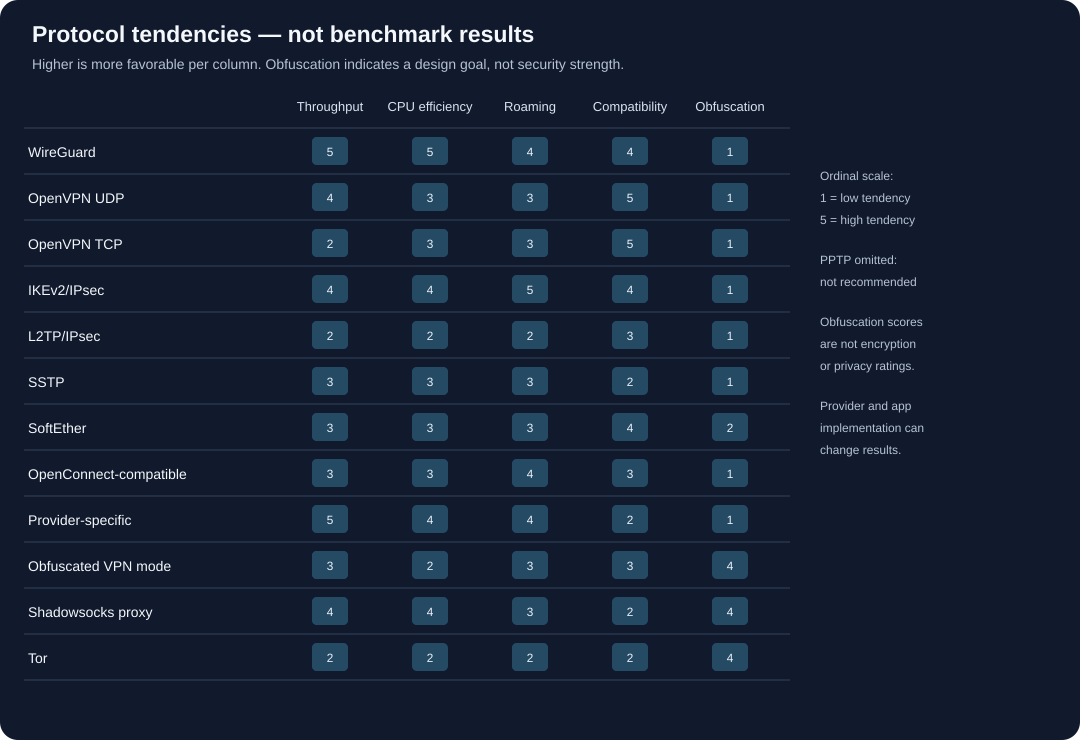
Qualitative design tendencies only—not measured benchmarks. Higher scores are more favorable for each named column; obfuscation scores describe whether it is a design goal, not whether encryption is stronger.
The individual ratings should not be added into a “winner” total. They represent different needs. A mobile commuter might value reconnection above raw throughput. A router administrator may care about CPU efficiency. Someone on a managed enterprise gateway may have no choice of protocol. A person seeking privacy from a local ISP may care more about the provider's operations than a one-point speed difference.
What “resource use” actually means
CPU cost depends on cipher implementation, hardware acceleration, kernel support, packet size, tunnel mode, client software, and the processor itself. A modern mobile CPU may handle encryption with negligible battery impact, while an older router may struggle at high throughput. Memory use is often less important than whether the implementation runs in a kernel or userspace and how much state the application manages.
Battery impact is not a fixed protocol property. A tunnel that keeps a radio active with frequent keepalives can consume more power than one that reconnects efficiently; an app suspended by the operating system may behave differently. A long-distance route can keep a mobile radio busy longer. Test your actual device and connection.
Why speed percentages are often misleading
“The VPN keeps 90% of your speed” is meaningless without specifying the test baseline, location, server, time, number of trials, measurement tool, protocol, connection type, and whether upload or download was measured. Speed tests can be limited by the testing server or ISP plan. One result should not be generalized across the provider's network.
For protocol selection, use a controlled comparison:
- Record an un-tunneled baseline to a reliable nearby test endpoint.
- Select the same VPN provider and nearby server for each protocol.
- Use the same device, access network, test server, and test window.
- Run at least several tests rather than cherry-picking the fastest.
- Record latency, jitter, loss, down/up throughput, reconnect behavior, and CPU/battery observations.
- Repeat at a different time and, if relevant, on mobile data.
- Stop if the test violates a network policy or creates an account/security risk.
The best protocol is often the fastest one that remains stable, supported, and appropriate for the task.
16. What Happens During a VPN Connection
Understanding a connection lifecycle helps explain why a protocol can be secure in theory yet fail in an app, and why a tunnel that appears connected may not carry every packet.
1. The client locates a gateway
The app resolves or selects a VPN server address. The endpoint can be hard-coded, returned by a provider API, selected from a list, or chosen automatically based on load and geography. If the device needs DNS to locate the endpoint, that lookup may happen before the tunnel exists. Apps may use a bootstrap resolver, cached result, encrypted DNS, or an operating-system resolver. This is one reason “always-on” behavior and a kill switch need to account for connection setup, not only the steady state.
2. The client reaches the server
The client sends the first protocol-specific packets. A firewall, NAT gateway, captive portal, or network policy may block or modify them. The route can be poor even if the server is geographically close. A failed handshake does not necessarily mean the protocol is insecure; the endpoint may be unavailable, the port may be blocked, the clock may be wrong, or the configuration may be mismatched.
3. The peers authenticate
The client must know it reached the intended VPN server, and the server must determine which client or account is allowed to connect. That can involve public keys, certificates, credentials, device tokens, or an app-managed control plane. Authentication errors should fail closed. Accepting an unknown certificate or skipping server identity checks to “make it connect” can allow an impostor to receive traffic.
4. They negotiate keys and parameters
The peers agree on session parameters and derive keys. Well-designed protocols use fresh session keys and provide forward secrecy under defined assumptions. The client and server also need to agree on supported algorithms, routes, tunnel addresses, DNS settings, and access policy. A protocol menu may hide all of this, but the service still makes choices.
5. The operating system installs routes
After authentication, the app creates or activates a virtual interface and applies routes. A full-tunnel setup may add a default route through the VPN. A split-tunnel setup adds only specific routes or applications. There can be a brief transition when routes change; reliable apps block traffic during that transition or manage the policy so it does not escape unexpectedly.
6. DNS and name resolution are configured
The client may set a provider DNS resolver, use an encrypted resolver inside the tunnel, or preserve a local resolver for selected domains. If DNS goes outside the intended path, the websites may remain protected by HTTPS while the local network can still learn queried domain names. Some local domains—such as a company intranet—may intentionally use a different resolver. The right behavior depends on whether the VPN is consumer privacy, enterprise access, or a split tunnel.
7. Packets are encapsulated and sent
The application emits an IP packet. The operating system routes it into the VPN interface, where the client encrypts and authenticates it, wraps it in an outer packet, and sends that packet to the gateway. The gateway validates and decrypts it, applies policy, and forwards it toward the destination. Replies travel back through the gateway and tunnel to the device.
8. The connection is maintained
NAT mappings expire, mobile networks change, radios sleep, and server routes change. Clients may send keepalives, re-handshake, probe connectivity, or automatically move to another endpoint. These choices affect battery use, resilience, and what metadata can be observed. A low keepalive interval can keep a NAT mapping alive but generate more traffic; a long interval may save power but create a pause when the connection wakes.
9. The tunnel closes
On disconnect, the app should remove routes and DNS settings safely, erase temporary key material as designed, and restore the original network path. A crash, sleep/wake cycle, app force-quit, or operating-system update may produce a different path than an orderly disconnect. For sensitive work, test failure behavior and keep the client updated.
This lifecycle illustrates why “protocol supports encryption” is only one layer. Security also depends on server identity, route installation, DNS, failure handling, and what the provider's software does around the protocol.
17. Cryptography Is a System, Not a Cipher Label
Users often compare VPNs by cipher names, key lengths, or phrases such as “military grade.” Those details matter, but they are easy to misinterpret without the rest of the design.
Confidentiality and integrity
Confidentiality prevents an observer without the key from reading protected packets. Integrity protection helps detect unauthorized modification. Modern authenticated encryption combines these properties. Older designs may use separate encryption and authentication components, which require careful pairing and configuration. A longer key does not automatically make a protocol safer if the implementation mishandles authentication, nonces, certificates, or keys.
Authentication is as important as encryption
Encryption to the wrong endpoint is still a problem. The client must authenticate the server identity and, for remote access, the server must authenticate the user or device. A certificate needs a trusted chain and matching name or identity. A public key needs to be provisioned and rotated securely. Consumer apps often simplify these tasks, but users still need to install the authentic application and protect the account.
Key rotation and forward secrecy
Protocols establish session keys and usually refresh them according to protocol-specific rules. Forward secrecy aims to protect past sessions if a long-term key is later compromised, assuming ephemeral key material was properly generated and discarded. It does not erase data already logged by a provider or a website. It also does not protect a live session if an attacker controls the endpoint or the active device.
Quantum considerations
Some VPN discussions promote “post-quantum” protection. Long-term confidentiality against future cryptanalysis is a legitimate research topic, but a VPN's security remains a chain of components: key exchange, authentication, implementation, software updates, server operations, and data retention. A post-quantum key exchange would not stop a provider from logging destinations or a malicious app from stealing a password. Evaluate the exact design and independently reviewed implementation rather than the marketing label.
Crypto agility versus a fixed suite
A configurable protocol can support multiple algorithms and compatibility modes, which is useful for migration and specialized environments. It also increases the number of combinations that must be implemented, tested, and maintained. A deliberately fixed modern suite reduces negotiation choices but can be less flexible for unusual devices or cryptographic policy. Neither approach is inherently correct in every context; the important questions are whether the chosen design is current, authenticated, reviewed, and maintainable.
Secure defaults matter more than power-user switches
Most users should leave provider app defaults intact unless they understand the reason for a change. Old guides may recommend disabling certificate checks, forcing obsolete ciphers, or changing ports without explaining the risks. A setting that improves compatibility by weakening verification can undermine the protection the tunnel is supposed to provide.
When reading protocol documentation, separate:
- What the protocol permits.
- What the implementation supports.
- What the provider configures by default.
- What the user can change.
- What independent testing has actually reviewed.
This avoids assuming that a standard's strongest possible configuration is what a given commercial app uses.
18. Use-Case Profiles: Which Properties Matter Most?
The same person may need different VPN behavior at home, on a phone, and on a work laptop. Choose the protocol based on the environment and the consequence of failure.
Everyday browsing on home broadband
For hiding browsing destinations from the ISP and routing through a provider, a current WireGuard-based app is often a practical starting point. OpenVPN is also reasonable where the provider's app is more stable or its implementation better fits the device. Use HTTPS, enable the app's leak protections, and understand what the provider can observe. If the only concern is advertising trackers, a VPN may not be the most effective tool; browser privacy controls and tracker blocking can be more targeted.
Public Wi-Fi
Modern HTTPS protects much ordinary browsing from passive local-network snooping. A VPN adds a tunnel around traffic and can reduce local metadata exposure, but it does not make a fake portal safe. A provider's app should reconnect reliably and handle DNS consistently. On managed work devices, use the employer's VPN. For very sensitive activity, a cellular connection may be preferable to an untrusted hotspot.
Mobile devices switching between Wi-Fi and cellular
Frequent network changes make reconnect behavior important. IKEv2/IPsec with mobility support and modern WireGuard apps can both work well. Measure real handoff behavior: how long does a call pause, does the app re-establish routes, and does traffic fall back outside the tunnel? Do not rank protocols solely by a desktop speed test.
Work and school remote access
Use the institution's VPN because it grants access to specific internal resources and applies the organization's identity, device, and logging policies. A consumer VPN is not a substitute for a work tunnel. In many corporate deployments, the VPN is a controlled extension of the organization's network, not a privacy service from the institution.
Site-to-site connections
For connecting offices or cloud networks, choose a protocol the firewalls and gateways support and the administrators can maintain. IPsec/IKEv2 has a long history in network equipment; WireGuard is attractive for simpler peer configurations; OpenVPN can fit an existing gateway. Consider key rotation, route propagation, failover, monitoring, overlapping address ranges, and the administrative emergency path. The fastest tunnel is not useful if no one can safely revoke a compromised peer.
Router-level VPN
A router may have a slower CPU and less memory than a laptop. It may support only certain protocols, and a single device-level tunnel can affect every household member, smart-home device, and local service. Test maximum throughput on the exact router, check local printer and media-server access, and verify how the router handles DNS if the tunnel drops. If the router cannot run a maintained implementation at the speed you need, a supported app on each device may be safer and faster.
Streaming and location switching
Providers may block known VPN exit addresses regardless of protocol. Switching WireGuard to OpenVPN does not necessarily change the exit IP or policy outcome. If streaming is the goal, evaluate service terms, provider support, and legal rights in your location; do not assume a protocol tweak can guarantee access. A VPN location does not change account country, payment region, or device GPS.
Gaming and real-time communication
Latency, jitter, and route quality often matter more than peak throughput. A VPN adds a network hop; sometimes the provider's route is better than the ISP route, often it is not. Choose a nearby endpoint, measure the actual game or call, and avoid forcing TCP tunnel mode for a lossy real-time path unless there is a specific reason. A VPN cannot fix congestion on the local Wi-Fi.
Privacy-focused browsing
A VPN can reduce what the ISP sees but shifts trust to the provider. For stronger separation from a single operator, some users consider Tor, but it has different performance and operational trade-offs. Combine tools only after understanding who sees the source, destination, account, and timing. A VPN subscription is not a substitute for minimizing logged-in identity and browser tracking.
Censorship circumvention
First consider whether use is lawful and safe. If permitted and appropriate, choose a provider with current documented support for an alternate connection method on your device. A protocol that worked last month may not work now. Have a non-sensitive test plan; do not test with another person's accounts or data. If the connection's use itself could put you at risk, get local expert guidance before acting.
19. Self-Hosting Versus a Commercial VPN
Running your own server can be educational and useful for remote access, especially when connecting back to a home network or private cloud. It is not automatically equivalent to a commercial privacy VPN.
What self-hosting provides
- Control over the server configuration, keys, routes, and update process.
- A private path to devices or services you administer.
- A known infrastructure bill and the ability to limit who can connect.
- A practical learning environment for WireGuard, OpenVPN, or IPsec.
What it does not provide by itself
- A large, geographically distributed set of exit addresses.
- Anonymity from the hosting provider or cloud network.
- Protection from a misconfigured firewall, exposed management port, or unpatched server.
- Independent verification that the operating system and software are correctly deployed.
- A way to hide use of a known cloud server from the ISP or destination network.
If the goal is secure remote access to a home NAS, a self-hosted WireGuard tunnel may be ideal. If the goal is to change the public IP shown to websites, a server in a cloud region will reveal that cloud exit address. If the goal is privacy from an ISP, the cloud host becomes a trust point and may have its own logs and legal obligations.
Operational responsibilities
A self-hosted gateway requires:
- Secure initial provisioning and private key storage.
- Server and client updates.
- Access revocation when a device is lost or a user leaves.
- Firewall rules that expose only intended services.
- DNS and route design.
- Backups of configuration without exposing private keys.
- Monitoring of service availability and security advisories.
- A documented recovery path that does not depend on an untrusted network.
Don't publish a management dashboard to the internet just to make setup easier. Use the project's supported installation and security documentation; avoid one-line installation scripts from unknown sources. If the server is for an organization, assign an owner and a maintenance schedule.
VPN Gate and public relays
Volunteer relay networks and public VPN lists can be useful for research or connectivity experiments, but they are not equivalent to a privacy-focused paid provider. The relay operator may see traffic metadata, the exit IP may be abused by others, and availability and security practices vary. Do not send sensitive logins or confidential work through a relay whose operator and behavior you cannot evaluate. Free access is not a privacy guarantee.
20. Troubleshooting by Symptom
Change one thing at a time and record what you changed. Randomly switching protocols, DNS resolvers, ports, and security settings at once makes it difficult to identify the issue.
The VPN will not connect
Check the app's status, server availability, device time, account status, and whether a captive portal is waiting for sign-in. Try another nearby server if the provider documents that option. If the network owner blocks VPN use, follow its policy rather than attempting to evade it. On a managed work device, contact IT.
It connects but websites do not load
Check DNS, default routes, split-tunnel rules, and whether the app's kill switch is blocking all traffic. A stale DNS response or MTU issue can cause some services to fail. Confirm that the VPN server is not overloaded and that the provider has not announced an outage. Do not disable certificate validation or other protections to make a site load.
Some apps work while others bypass the VPN
Review split tunneling, per-app exclusions, proxy settings, and OS-level networking. Some apps use their own encrypted DNS or direct connections. On managed devices, policies may route only organization traffic through the corporate VPN. Confirm intended scope before assuming the VPN is device-wide.
The connection is slow
Compare against a direct baseline and a nearby server. Check Wi-Fi signal, server load, route, device CPU, and other network users. Switch between supported protocols only as a controlled test. TCP mode may be slower on a lossy path. A router's CPU can be the bottleneck. If multiple servers and protocols are slow, contact the provider or ISP before changing security settings.
The connection drops when moving networks
Check app and OS updates, background permissions, battery optimization, and roaming support. IKEv2 mobility features and WireGuard roaming behavior can help, but behavior depends on the app. If the device is managed, its network policy may terminate sessions. Test with a harmless connection, not during a critical call or emergency.
Captive portal will not appear
The VPN may block portal redirection, or the network may require initial registration. Follow the venue's instructions and disconnect only as needed to reach the legitimate portal. Never enter an email or banking password into a portal. Reconnect the VPN after registration and confirm the tunnel status.
A site says the VPN is blocked
The site may block the VPN's exit IP, require additional verification, or impose location restrictions. Switching protocol may not change the exit address. Follow the site's rules and local law. Do not install unknown browser extensions or certificates claiming to fix the block.
A leak test reports a DNS or IP issue
Understand exactly what the test measured. A DNS resolver may be operated by the ISP but queried through an encrypted channel; an IPv6 address may be intentionally blocked; a browser extension may report a separate proxy state. Consult the VPN provider's documented test procedure and OS settings. Treat unexplained real-address exposure as a reason to pause sensitive use until resolved.
21. Provider Picks by Protocol and Use Case
There is no honest “best provider for every protocol” list. Many safe services intentionally support only a few modern protocols. Some protocol options are platform-specific; free plans may use a different server pool or app feature set. Provider mergers, policies, pricing, and features can change. Use the following as a shortlist to verify, not a guarantee of protocol support on every client.
| Need | Free option to investigate | Paid option to investigate | Why it may fit | Verify before relying on it |
|---|---|---|---|---|
| Everyday WireGuard | Proton VPN Free | Mullvad, IVPN, Proton VPN | Modern protocol; strong choices among privacy-oriented providers | Exact app support, free-tier protocol availability, current terms, locations |
| OpenVPN compatibility | Windscribe Free or Proton VPN Free, if current app supports it | IVPN, Proton VPN, Windscribe | Mature client ecosystem and manual configuration options | Operating system, transport, account plan, config and DNS behavior |
| IKEv2/IPsec integration | No broadly recommended free pick | Organization-managed VPN; otherwise research a paid provider that documents IKEv2 for your device | Native OS and corporate gateway compatibility | Per-OS availability, certificate/authentication model, NAT behavior |
| L2TP/IPsec legacy access | No recommendation | Use only if an approved legacy system requires it | Interoperability, not modern first choice | Confirm actual IPsec protection and plan a migration |
| PPTP | None | None | No suitable security-sensitive use | Retire rather than select |
| SSTP | No recommendation | Organization-managed Windows gateway, if required | Narrow Windows-centric compatibility | Current support, certificates, exact client and server owner |
| SoftEther | Self-hosted software, not a provider | Managed infrastructure only if reviewed | Flexible test or gateway platform | Operator, updates, exposure, mode, logs, routes |
| OpenConnect / AnyConnect | A gateway you administer or an institution authorizes | Employer/university's official service | Access to a managed organization network | Approved client, identity, device policy, routes |
| Provider obfuscation | Proton VPN or Windscribe free tier, if current feature is included | Proton VPN, Windscribe, or another provider with documented support | May work on some networks where ordinary VPN traffic is blocked | Local law/policy, exact client, plan, feature availability, personal safety |
| Tor-based anonymity | Tor Browser (free) | Not a paid VPN service | Different multi-relay trust model for browsing | Tor documentation, browser safety, local risks |
| Shadowsocks proxy | Self-hosted or a trusted, explicitly documented service | No universal retail recommendation | Application proxying in supported workflows | Scope, DNS, server operator, whether it is truly the intended client |
Why a free VPN deserves extra scrutiny
Operating relays, support, software, and bandwidth costs money. A free provider might be funded by a paid tier, donations, an organization, or a business model that deserves careful scrutiny. The phrase “free VPN” does not reveal how the service earns money or what it collects. Avoid apps that promise unlimited free service while offering no credible ownership, privacy documentation, independent scrutiny, or clear limits.
Free services often have fewer locations, a queue, lower priority, limited devices, data caps, or unavailable features. These are not automatically bad; transparent limitations can be preferable to an unclear service. But if you need a specific protocol for a critical connection, test that the free tier actually includes it before depending on it.
Why paid does not mean private
Payment buys capacity and features, not virtue. Compare:
- What account details are required?
- Can you pay without tying the account to a personally identifying payment method, and what does the payment processor learn?
- Is the no-logs claim specific and independently reviewed?
- Are the audit scope and date public?
- What happens during a legal request or server seizure?
- Does the provider disclose ownership, jurisdiction, and subprocessors?
- How does the app handle crashes, telemetry, DNS, IPv6, and tunnel drops?
- Can the protocol be selected on your actual platform?
- What are renewal prices, refund terms, and cancellation mechanics?
Use the separate VPN service comparison for a broader look at vendors, pricing, streaming, and service-level criteria. That article and this protocol guide answer different questions: protocol suitability does not validate a company's business model.
22. Privacy: What Changes When You Turn a VPN On
A VPN shifts trust. It does not remove trust. Understanding exactly what moves helps avoid both overconfidence and unnecessary fear.
Local network and ISP
With a correctly configured full tunnel, the local Wi-Fi operator or ISP generally sees a connection to the VPN endpoint and metadata such as timing and volume, but not the inner packet contents. It may still infer that a VPN is being used. DNS handling depends on the client and configuration. Split-tunnel exceptions and direct app connections may bypass the tunnel.
VPN provider
The provider receives traffic from the tunnel and sends it onward. HTTPS can protect content between a browser and a website, but the provider may see connection destinations, DNS requests, source IP, timing, and account information depending on system design. A “no logs” claim concerns a provider's operational practices and must be evaluated with policy details and independent evidence, not inferred from WireGuard, OpenVPN, or any other protocol.
Website and app operators
Websites see the VPN exit address, but can still recognize accounts, cookies, browser fingerprints, device identifiers, and behavior. Logging into a personal account can identify the user immediately. A VPN is not an anonymous browsing mode.
The device
Malware, malicious browser extensions, cloud backups, device management, and operating-system telemetry can expose information outside the tunnel. A VPN cannot repair an infected device or prevent a person with device access from inspecting activity.
Payment and account provider
Payment processors and email providers can associate a VPN account with a person. Pseudonymous sign-up or alternative payment can reduce some linkability, but payment records, IP addresses at account creation, support interactions, and device fingerprints may still create connections. Read our privacy guide for complementary steps.
A threat-model table
| Concern | VPN may help against | VPN does not by itself solve |
|---|---|---|
| Public Wi-Fi observer | Reading traffic protected inside the encrypted tunnel | Fake hotspots, phishing, compromised devices, unsafe captive portals |
| ISP/network visibility | Seeing many destination details from tunneled traffic | Seeing that a VPN endpoint is in use; all traffic metadata |
| Website tracking | Hiding the home IP from the site | Account identity, cookies, browser fingerprinting |
| Censorship/filtering | Some destination or content blocks, depending on the network and method | All blocking, endpoint detection, law or policy consequences |
| Account privacy | A provider account may separate browsing from direct ISP records | Linking through payment, email, device, or provider records |
| Location | Presenting an exit IP associated with another region | GPS, account region, browser location, payment address |
| Malware | Very little directly | Infection, credential theft, malicious downloads, unsafe apps |
23. Circumvention: Use Cases, Constraints, and Safer Decision-Making
People use VPNs and related tools for legitimate reasons: connecting to an employer's private network, avoiding unnecessary tracking on a network they do not trust, accessing lawful information while traveling, or maintaining communication when a provider or network blocks ordinary services. The same technical capability can conflict with a network owner's rules or local law. A responsible guide must discuss both.
Different kinds of blocking
“VPN blocked” can describe several different conditions:
- A router or network administrator blocks a port or category of traffic.
- A provider restricts a site by IP address or geography.
- A country filters domains, addresses, protocols, or content.
- A school or employer applies a policy to managed devices.
- A hotel or public hotspot forces traffic through a captive portal.
- A VPN server becomes unreachable due to congestion or outage.
The right response depends on which one applies. A captive portal may simply require lawful registration. A corporate access policy should be addressed with the administrator, not evaded. Government censorship may have serious personal consequences. A provider's support page cannot assess the safety of a person's situation.
Protocol behavior under filtering
Standard WireGuard is UDP-based and not designed to disguise itself. OpenVPN can use UDP or TCP, but a TCP connection is not necessarily indistinguishable from ordinary web traffic. IKEv2/IPsec uses recognizable exchanges and can be blocked. Obfuscation layers may change traffic appearance, but may be detected, blocked, or unstable. The observable endpoint address, timing, packet sizes, and connection behavior can still provide signals.
No protocol can promise “unblock everything,” “invisible VPN,” or “impossible to detect.” These are red-flag claims. A feature's ability to connect in one place at one time says little about another network or future conditions.
Public Wi-Fi is not automatically a censorship problem
For ordinary public Wi-Fi privacy, HTTPS already protects much web traffic. A VPN can hide browsing metadata from the local network and reduce exposure of non-HTTPS traffic, but may interfere with captive portals. Use a trusted provider and follow the venue's rules; for sensitive work, prefer your organization's approved VPN or a mobile connection. See our public Wi-Fi safety guide.
When safety comes first
In high-risk environments, downloading a circumvention app, creating an account, contacting support, or repeatedly retrying blocked endpoints may create records. An adversary may control the device, network, or service provider. People should consider the safety of family members, colleagues, sources, and contacts—not only their own connection.
Use up-to-date digital-safety resources from organizations that understand the country and threat model. Do not install unknown profiles or certificates because a forum tells you to. Do not accept a provider's “no logs” promise as proof that a connection cannot be observed. If there is a credible risk of detention, violence, job loss, or harm to another person, pause and seek trusted local advice. Sometimes not connecting is safer.
Legal and policy note
VPN legality and permitted uses vary across jurisdictions and institutions. This article is general technical education, not legal advice. Check the current rules that apply to your location and network. Do not use a VPN to gain unauthorized access, evade security controls on systems you do not administer, conduct harassment, conceal crime, or expose another person's private information.
24. How to Choose a Protocol: Decision Tree
Use this sequence rather than shopping by protocol name:
- Is this a work, school, or managed-device connection? Use the organization’s approved client and gateway. Do not substitute a retail VPN for an organization's access control.
- Is the requirement ordinary consumer privacy on your own devices? Start with a reputable provider's default WireGuard-based option or OpenVPN; test reliability and DNS behavior.
- Do you have a device or gateway requirement for IKEv2/IPsec? Confirm the exact OS, authentication, certificate, and server support. Use the provider's official app or administrator configuration.
- Does the network block the normal protocol? First confirm the network policy. If you are authorized and it is lawful, see whether a documented provider obfuscation option is available. Do not assume a TCP option is stealth.
- Is the target app the only traffic that needs proxying? A proxy may fit, but check which traffic and DNS queries actually use it. For device-wide routing, a VPN may be clearer.
- Is the goal anonymity rather than privacy from the local network? Learn Tor's distinct trust model and its limitations. A VPN alone does not provide anonymity.
- Are you asked to use L2TP/IPsec or PPTP? Ask why. L2TP/IPsec usually indicates a legacy compatibility constraint; PPTP should be replaced for secure traffic.
- Does the provider support the protocol on all your devices and plan? Verify directly; app menus and marketing pages can differ.
- Can you safely test it? Compare stability, DNS, IPv6, kill-switch behavior, battery, and speed in your own environment.
- Does the tool's use create legal or personal risk? Stop and seek trusted guidance before connecting.
25. A Repeatable At-Home Protocol Test
Testing your VPN is useful, but do not mistake a speed test for a security audit. Keep the test within networks and devices you own or are authorized to use.
Prepare
- Update the VPN application and operating system.
- Choose a nearby server and record the city or region, not a personally identifying activity history.
- Use the same test service for baseline and VPN runs.
- Close bandwidth-heavy background applications.
- Note whether the test uses Wi-Fi, Ethernet, or mobile data.
- Check your access plan's expected maximum; a 100 Mbps connection cannot meaningfully compare a 1 Gbps tunnel.
Measure performance
Run multiple trials with the VPN off and then on. Record median download, upload, latency, jitter, and loss if the test provides them. A speed test is only one destination and one moment; repeat at a different time. If available, test the protocols within the same provider app and use the same server location.
Do not rely on a distant server's result to judge the protocol in general. Distance and route length add latency. The provider's nearest advertised region may be virtual or physically farther away; check its server-location documentation if that matters to your threat model or performance.
Check behavior, not only speed
- Does the app reconnect after switching from Wi-Fi to mobile data?
- Does DNS remain with the configured resolver?
- Does IPv6 route through the tunnel or get deliberately blocked?
- Does the kill switch block traffic during a forced disconnect?
- Are local devices still reachable if you need them?
- Does the app expose which apps or routes bypass the tunnel?
- Does the provider's app update and revoke stale keys?
Only perform disconnect or leak tests on your own device and network, and restore the normal configuration afterward. On managed devices, coordinate with the administrator. A single test does not prove that no leak can ever occur.
Interpret results cautiously
If a protocol is slower, first check server load, device CPU, route, Wi-Fi signal, MTU, and background traffic. If one site fails but others work, inspect DNS and the site's own behavior before concluding that the protocol is broken. If the VPN disconnects frequently, reliability may matter more than its peak speed. Choose the stable option that meets your privacy and policy needs.
26. Common VPN Protocol Myths
“A VPN protocol with more encryption is automatically more private.”
Encryption protects data in transit between endpoints. It does not determine provider logging, account anonymity, server security, DNS configuration, or website tracking. Stronger marketing adjectives do not answer who operates the exit server.
“TCP is stealthier than UDP.”
TCP and UDP are transports, not invisibility modes. A TCP tunnel may traverse networks that block UDP, but traffic can still be identified by endpoints and behavior. TCP-over-TCP can perform poorly on lossy routes.
“WireGuard does not log, so every WireGuard VPN is no-logs.”
WireGuard's protocol design does not require browsing-activity logging. The VPN service still operates accounts, servers, authentication, endpoints, and support systems. The provider's policy and implementation determine what it stores.
“Open-source means audited and safe.”
Open source makes code available for inspection; it does not prove that anyone inspected the deployed version, that the server code is open, or that a branded app matches the repository. Look for independent reviews with scope, date, and findings.
“Two VPNs are twice as private.”
Chaining services adds complexity and additional operators. It can increase latency and create new failure modes. A poorly configured chain can route some traffic outside both tunnels or reveal more metadata to each provider. Use multi-hop only with a specific threat model and transparent design.
“A VPN changes my GPS location.”
A VPN changes the source IP seen by remote sites. It does not necessarily change device GPS, mobile location services, account country, payment address, or browser permissions.
“A free VPN is safe because the app store approved it.”
App-store review is not a full audit of a provider's business model, logging, security, ownership, or every future update. Read policies, research independent reviews, and avoid services that ask for excessive permissions.
“A kill switch proves there can never be a leak.”
Kill switches differ by operating system and app. They may not cover every interface, startup period, DNS request, local-network route, or app exception. Test the exact setup and understand its behavior.
“Changing protocols makes a user untraceable.”
Protocols can change the outer connection and performance. Websites, accounts, cookies, browser fingerprints, device telemetry, and provider records remain. Protocol switching is not identity erasure.
27. Buying Checklist: Evaluate the Provider, Not the Protocol Badge
Before choosing a provider, check each of these with the current product documentation:
Protocol and app support
- Is the protocol available on Windows, macOS, Linux, Android, and iOS—or only some?
- Is it included in the free plan?
- Can you choose it manually, or does an “automatic” setting switch protocols?
- Is the client maintained and signed by the expected publisher?
- Are official configuration files available if you need router support?
- What happens to DNS and IPv6 in split-tunnel mode?
Privacy and accountability
- Is the legal entity and ownership clear?
- Does the privacy policy say what connection metadata, diagnostics, and account information are collected?
- Is a no-logs claim independently assessed? Is the report recent and public?
- Are audits limited to a code snapshot, a server environment, or a policy review?
- How does the service respond to legal demands and security incidents?
- Does the provider disclose server ownership, virtual locations, and infrastructure partners?
Security of the product
- Are apps open source, reproducibly built, or independently reviewed?
- Are updates signed and distributed through official channels?
- Is multifactor authentication available for the account?
- Does the app offer a kill switch and leak protections on your OS?
- Are protocol implementations kept current?
- Does the provider explain vulnerability reporting and patch practices?
Commercial reality
- What is the total first-term and renewal price?
- How long is the commitment?
- What is the refund or cancellation process?
- How many devices can connect simultaneously?
- Do you need a special plan for routers, port forwarding, or static IPs?
- Are free-tier limits and server selection clearly described?
The most secure protocol cannot compensate for an app you do not update, an account with a reused password, or a provider whose terms you cannot evaluate. If an app asks for broad permissions unrelated to VPN operation, investigate before granting them.
28. A Note on Recommendations and Testing
This guide compares protocol characteristics and provider options using published project and provider documentation available at the time of writing. It does not claim to have benchmarked every listed protocol, audited providers, or tested circumvention from every region. Provider capabilities, free-plan limits, terms, server locations, and local laws change; confirm those details on official pages immediately before choosing a service.
The ratings in the matrix are qualitative design tendencies. They should not be treated as measured throughput, battery tests, or a security certification. An independent audit of a protocol or codebase is not an audit of every provider's complete service. A provider's own documentation is useful for understanding features but should be read as a statement from that provider.
Our current broad service roundup is Best VPN Services in 2026. Use it alongside this guide: first identify which protocol family and use case fit; then evaluate the vendor's pricing, operations, privacy policy, and product quality.
References and Further Reading
Standards and implementation pages are primary sources for how protocols are designed. Provider pages explain provider-specific features but are not independent verification. Product plans and regulatory conditions can change; check the current page and date before acting.
Standards and protocol projects
- WireGuard, Protocol & Cryptography. Project description of handshake and data packet design. wireguard.com/protocol
- WireGuard, Known Limitations. Includes notes that WireGuard does not focus on obfuscation and does not tunnel over TCP natively. Known limitations
- WireGuard source and tools. Official project information and links to implementations. WireGuard · wireguard-tools
- OpenVPN Community. Documentation and source links for the OpenVPN project. OpenVPN Community
- OpenVPN 2.6 Manual. Reference for current configuration options; defaults and directives vary by version. Manual
- OpenVPN source repository. github.com/OpenVPN/openvpn
- RFC 7296, Internet Key Exchange Protocol Version 2 (IKEv2). IETF standards-track specification. RFC 7296
- RFC 4301, Security Architecture for the Internet Protocol. IPsec architecture. RFC 4301
- RFC 4555, IKEv2 Mobility and Multihoming Protocol (MOBIKE). Background on mobility extensions. RFC 4555
- RFC 2661, Layer Two Tunneling Protocol (L2TP). Describes L2TP tunneling, not a complete encryption guarantee. RFC 2661
- RFC 2637, Point-to-Point Tunneling Protocol (PPTP). Historical informational specification; not a current security recommendation. RFC 2637
- strongSwan. Open-source IPsec implementation and project documentation. strongswan.org · GitHub
- Libreswan. Open-source IPsec implementation. libreswan.org · GitHub
- SoftEther VPN. Project and implementation documentation. softether.org · GitHub
- OpenConnect. Open-source client project for compatible enterprise VPN gateways. Project page · Source
- Shadowsocks. Project documentation and organization. shadowsocks.org · GitHub
- Tor Project. Browser manual, support resources, and community documentation. Support · Browser manual · Community
Privacy and provider resources
- Privacy Guides, VPN overview and recommendations. A third-party resource for threat-model framing and provider criteria; verify its current criteria and publication date. VPN guidance
- Proton VPN, Stealth protocol. Provider's description of its own anti-censorship feature; not a guarantee that it works in every region. Stealth overview
- Mullvad, Why WireGuard. Provider's explanation of its WireGuard implementation and operational choices. Mullvad support
- NordVPN, NordLynx. Provider's explanation of its WireGuard-based implementation. Verify current vendor documentation for implementation details. NordLynx overview
- ExpressVPN, Lightway. The provider's open-source Lightway implementation and protocol documentation. The repository's platform support does not imply that every commercial app feature is open source. Lightway on GitHub
- Wikimedia Commons, “TP-Link AX1500 Wi-Fi 6 Router Front.” Hero photograph by Abhi25t, CC BY-SA 4.0. File page · License
Final Takeaway
For most people, the sensible starting point is a maintained provider app using WireGuard or OpenVPN. IKEv2/IPsec is a good fit for some managed and mobile scenarios. Provider-specific protocols may be convenient but trade interoperability for integration. Obfuscation can help in some restricted networks, but it cannot guarantee access or safety. Shadowsocks is a proxy, Tor is a separate network, and PPTP should be retired.
Above all, do not let the protocol name substitute for a threat model. Ask what you want to hide, from whom, and what you are willing to trust. Then verify the provider, account, app, settings, and local rules. A well-chosen VPN can be a useful privacy layer; it is not a cloak, a permission slip, or a replacement for secure devices and sound judgment.