The Big Shift: AI Agents Are Becoming a New Work Layer
If you have been paying attention to the AI landscape over the last year, the story has changed. It is no longer enough to ask a chatbot a single question and hope for a useful answer. The best users now work with AI as a kind of operating layer for knowledge work.
This is not about replacing thinkers. It is about changing the cadence of work:
- a draft gets produced fast instead of after a long blank-page stare
- research gets summarized in minutes instead of hours
- a meeting can become a clean brief, action list, and next-step plan in one pass
- a messy document becomes a sharper version without a second full rewrite
- the routine parts of work get normalized so you can spend energy on judgment
The high-leverage person in 2026 is not the one who asks a chatbot for everything. It is the one who has turned recurring tasks into repeatable systems.
That is what “AI agent workflows” really mean. They are not autonomous robots running your whole life. They are structured ways to get useful output from a model without sacrificing quality, clarity, or trust.
Why This Feels Different Now
A lot of AI content from the last two years focused on single prompts. “Write a blog post,” “summarize this document,” “make this better,” “create ten ideas.” That was useful, but it was also a trap. It invited the idea that the AI assistant should be treated like a magic genie.
The more mature version is this: the model is a task engine, and you are the manager of the workflow.
That feels different because it aligns with how modern work actually happens:
- your work is messy
- your inputs are fragmented across notes, emails, documents, and meetings
- your outputs must be reviewed by humans
- your context changes frequently
- you need systems that adapt, not isolated one-off prompts
Now imagine a workflow like this:
- You paste a long email chain or meeting transcript.
- You ask the assistant to convert it into a decision summary, open questions, and next actions.
- You ask it to propose three options for a response.
- You pick the best direction.
- You ask for a final draft in a specific voice and length.
- You check the claims, the dates, the names, and the facts.
That is AI in service of work. It is not replacing your internal judgment — it is expanding your capacity.
The Real Objective: Reduce Friction, Not Just “Do More”
Most people approach AI as a productivity question: “How can I make this faster?” That is valid, but incomplete.
The real objective is to reduce friction in a specific work system:
- less time lost in the blank page
- less time spent rewriting the same thing in different voices
- fewer hours spent trying to find the real issue in a long thread
- fewer meetings where the recap is more confusing than the original discussion
- faster preparation for decisions that actually matter
When you design a workflow around a recurring task, the job changes from “ask the AI for help” to “run a repeatable process.” That creates compounding gains. The same system can be used again and again.
That is why the best AI workflows feel almost boring. They are not glamorous. They are useful. They save time every week.
The New Knowledge Work Stack
Think of AI as a small stack rather than a single buzzword.
The best setups often involve a few pieces:
- a primary assistant for conversation and drafting
- a research mode or web-enabled search tool
- a long-context document workflow for PDFs, transcripts, or large notes
- a note-keeping layer for prompts and reusable instructions
- a review habit that checks facts, dates, and assumptions
That sounds more complex than it is. You do not need a dozen apps. You just need a clear workflow and a consistent place to keep your useful prompts, instructions, and source documents.
If you use one chatbot often, you can create a very effective “AI operating system” with just a few repeatable patterns.
The Best Workflows Are Built Around Jobs, Not Prompts
A lot of people try to “prompt engineer” every single task individually. That works for experimentation, but it is not how you build efficient systems.
Instead, start from the work itself.
Ask: What are the recurring jobs in my day or week?
Common examples:
- reading and summarizing long reports
- writing first drafts of emails or proposals
- turning notes into action items
- generating versions of the same message for different audiences
- researching options before a decision
- planning a project or sprint
- drafting memos, handoffs, and update notes
- reviewing customer feedback and extracting themes
Each of these jobs can become a workflow. And the workflow, not the prompt, is where the value lives.
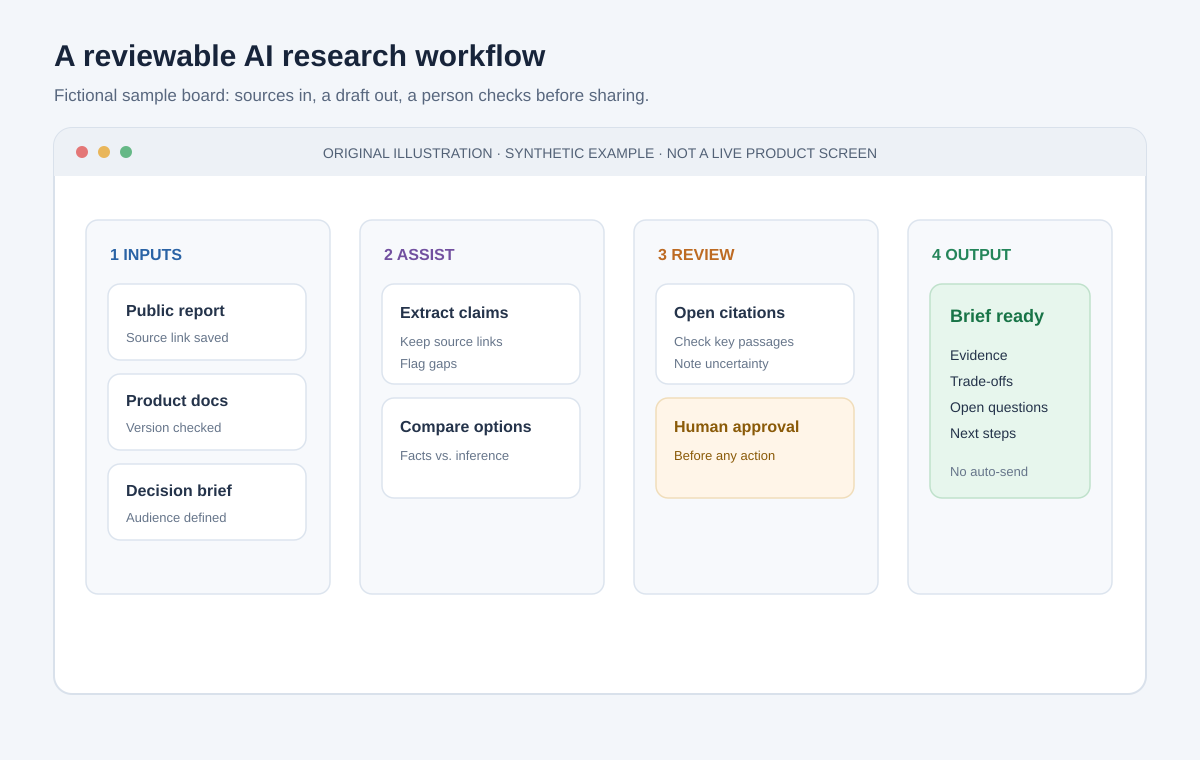
Original workflow mockup with fictional tasks; it is not a screenshot of a specific AI product.
Workflow One: Research Briefs That Turn Noise Into Decisions
One of the most useful AI-agent workflows in 2026 is “research brief generation.”
Instead of opening ten tabs and reading five different sources, you can do this:
- Gather the source links or documents.
- Tell the AI the goal, audience, and decision criteria.
- Ask it to extract the important facts, arguments, risks, and missing information.
- Ask it to list the evidence and where it came from.
- Ask it to give you recommended next steps or decision questions.
What makes this useful is that it converts a noisy information environment into a concise decision-ready brief.
Example prompt:
I am comparing four project management tools for a growing startup. Please read the sources I provide and summarize: the strongest value proposition, key trade-offs, likely pain points for teams of 8–15 people, and the questions I should ask before buying. Separate facts from assumptions and highlight anything not clearly supported by the source material.
This works especially well when your job involves evaluating options, scanning market landscape, or creating due diligence notes.
The important part is not the prompt perfection. It is the structure:
- defined objective
- defined audience
- criteria for comparison
- require separation of evidence from speculation
- request for missing information
That will produce far better results than vague prompts like “give me some ideas about project management tools.”
Workflow Two: Draft First, Then Refine
A huge amount of professional work is not “thinking from scratch.” It is writing. And writing is one of the most obvious places for AI to help.
The best workflow is not “AI writes the whole thing.” It is “AI drafts the structure, then you refine the result.”
The pattern looks like this:
- Ask for three options on the opening or framing
- Ask for a draft in a specified format and audience
- Ask for a version that is shorter, sharper, or more assertive
- Ask for a line-by-line critique of the draft
- Then rewrite only what matters
This creates a human-centered editing loop rather than a blind regeneration loop.
A strong pattern:
Draft a 500-word update email to customers explaining a new feature launch. Use a calm, confident voice, mention the practical benefits, and keep the message under 150 words if possible. Include three customer-facing benefits and one sentence explaining what is changing. Then provide a final version and a list of the assumptions I should verify before sending.
The key benefit is that AI becomes a drafting partner. It helps you think in structure, not just output text. You still own the exact message and final judgment.
This is especially useful when you are writing:
- status updates
- meeting notes
- customer emails
- interview summaries
- product launch copy
- internal briefings
- proposal outlines
Workflow Three: Meeting Triage and Decision Capture
Meetings are expensive, confusing, and often under-documented. A strong AI workflow can convert them into something useful.
The workflow is simple:
- Paste the transcript or notes.
- Ask the AI to identify decisions, action items, open questions, and unresolved conflicts.
- Ask it to summarize the discussion in plain English.
- Ask for a one-paragraph leadership update and a bullet list of next steps.
- Export the results into your task system or project notes.
This is a classic “value after the meeting” workflow. It is a way of turning a live conversation into a useful artifact that survives past the moment.
You can specifically ask the model to do things like:
- separate “facts” from “opinions”
- list who owns what
- highlight blockers or dependencies
- identify risks or missing information
- suggest the decision criteria for the next step
This is one of the best examples of AI “working with” knowledge work rather than trying to replace it.
Workflow Four: Information Distillation and Knowledge Capture
The modern problem is not a lack of information. It is an overload of information.
The best AI workflows turn raw material into durable, retrievable knowledge. This includes:
- turning notes into a reference document
- summarizing a long report into decision-making points
- extracting your own recurring patterns from past work
- converting a messy research pile into a structured briefing
- turning a handoff into an actionable note for the next person
The pattern is often:
Here is a set of notes from past projects. Organize them by recurring problem type, identify the patterns, and create a reusable checklist for future work. Also flag anything that is context-dependent and should be reviewed by a person before being reused.
This is where AI becomes an asset beyond day-to-day tasks. It helps you build a reusable memory for your own work. That matters because knowledge work compounds when you stop treating every task as a blank sheet and instead reuse patterns.
Workflow Five: Personal Task Planning and Decision Support
Not every AI workflow should be about output. Some of the best ones help you make better decisions.
Examples:
- ranking options by trade-offs
- generating a week plan based on constraints
- turning a large goal into a set of weekly priorities
- highlighting the hidden risks in a decision
- asking the model to help you design a decision checklist
This is especially useful for work that feels uncertain or overloaded. AI can help you see the structure beneath the noise.
Example:
I need to decide whether to hire a contractor, bring in a freelancer, or build this internally. Compare the options based on speed, quality, cost, maintainability, and risk. Give me a recommendation and the questions I should ask before signing any contract.
This kind of workflow is valuable because it does not replace your decision-making. It clarifies the decision surface and helps you assess trade-offs more cleanly.
The Instruction System That Makes It Work
Once you get past the hype, there is a practical truth: good AI workflows depend on good instruction design.
The most reliable structure is not one giant magical prompt. It is a layered brief.
A strong instruction has five parts:
- Role: “You are an experienced project manager.”
- Goal: “Turn this transcript into an action plan.”
- Context: “The team is three people, the deadline is Friday, and the budget is fixed.”
- Constraints: “Give me the final answer in bullets, separate facts from assumptions, and highlight risk.”
- Output format: “Use headings, then numbered actions, then open questions.”
This seems simple, but it is extremely effective. The model handles formatting and structure far better when the role and boundaries are clear.
The moment you give a model a vague instruction like “help me with this,” you get generic output. The moment you give it a concrete role and decision context, the quality jumps.
A Prompt Library Is Better Than One Amazing Prompt
The real difference between casual users and power users is not “clever prompts.” It is a library of prompts and processes.
The strongest users maintain a small set of reusable templates for:
- email drafting
- meeting recaps
- competitive research
- internal summaries
- creative ideation
- project planning
- decision support
- content rewriting
You do not need a massive system. You need a few high-quality, repeated workflows.
A simple system is enough:
- one file for strong prompts
- one file for your “context and role” notes
- one file for “default constraints” you reuse
- a folder for meeting notes and source material
This makes the AI feel more like a skill amplifier than a random assistant in the cloud.
Why AI Workflows Fail
Not every workflow succeeds. In fact, many fail for predictable reasons.
The system is too vague
If the task is unclear, the model will produce generic output. A clear objective is the main differentiator.
The user asks for too much at once
If the task includes multiple goals with different audiences, the output often becomes muddy. Split the job into small stages.
The person trusts the output too early
A confident answer is not necessarily a correct answer. You still need review and verification.
The workflow is not grounded in source material
When models are forced to infer too much, they make stuff up. Feed them the relevant text, notes, or documented facts.
The task is too high-risk without review
An AI system is not a substitute for accountability. It is a support tool.
The best workflow keeps the model in a useful lane: brainstorming, drafting, summarization, extraction, and option generation. The final decision remains a human responsibility.
The Verification Habit That Stops Bad Output
This is the non-negotiable part.
A great AI workflow includes a verification layer.
Before you send or act on anything, check:
- names and spellings
- dates and deadlines
- numbers and figures
- quoted material
- legal or compliance requirements
- missing context or assumptions
- whether the output is overly certain when the evidence is weak
A good rule is simple:
- treat draft generation as flexible
- treat facts, citations, and numbers as evidence-based
- treat final judgment as human-owned
Once you get that balance right, the AI becomes more useful and less risky.
How to Build Your Own Agent Workflow in 30 Minutes
You can start without reinventing your whole work life.
Pick one recurring task that takes more than 20 minutes a week and build a workflow around it.
Example: Weekly research digest
Goal: summarize relevant market articles, compare the big trends, and output an action list.
Workflow:
- Save the articles or links.
- Ask the AI to extract the key claims.
- Ask it to identify which claims are supported vs. speculative.
- Ask it to draft a short internal summary with action items.
- Ask it to suggest what to read next.
Example: Meeting-to-action pipeline
Goal: turn meeting notes into a next-step document.
Workflow:
- Paste the transcript.
- Ask for a structured recap.
- Ask for a list of decisions and each owner.
- Ask for a clean summary for leadership.
- Put the output into your task system.
Example: Email rewrite system
Goal: create clear, human-sounding communication without rewriting from scratch.
Workflow:
- Paste the raw message.
- Ask for 3 versions with different tones.
- Choose one.
- Ask for a tighter final version.
- Review the final result for factual accuracy and tone.
Start small. The workflow only needs to be useful enough to save you time this week.
The Real Advantage: Reusable Systems Beat Occasional Genius
A lot of AI content focuses on one-off impressive outputs. That is not the durable value.
The durable value appears when you build a workflow you can reuse every week.
That means:
- the system is repeatable
- the instructions are consistent
- the outputs are reviewed
- the workflow reduces labor while keeping quality
- the prompts become resources, not a one-time trick
This is what makes AI feel like a real work tool instead of a gimmick.
People who get value from AI are not always the ones with the most advanced tools. They are often the ones with the best process.
The Best AI Workflow Is a Human-AI Partnership
The phrase “AI agent workflow” can sound automated and impersonal. In practice, the successful version is a partnership.
The AI does the heavy lifting in the parts of work where pattern matching, drafting, summarization, and formatting shine.
You do the work that requires taste, context, ethics, judgment, trade-offs, and accountability.
That is a healthy division of labor.
Think of it this way:
- AI is excellent at creating the first rough version, scanning lots of information, and organizing chaos.
- humans are great at deciding what matters, making the call, and being responsible for the outcome.
The best workflows respect that division.
That is why the strongest AI systems feel less like automation and more like leverage.
A Better Way to Think About AI in Your Career
If you are trying to future-proof your work, do not think of AI as a replacement. Think of it as a multiplier for the kinds of tasks that dominate knowledge work.
The jobs that are most likely to improve:
- writing and editing
- summarization and knowledge management
- research and comparison
- operating on messy inputs
- converting raw notes into clear output
- synthesizing multiple perspectives into a decision brief
If you can build a small but reliable system around those tasks, the gains come quickly.
You are not “turning your job into a robot.” You are making your workflow more efficient, more organized, and more focused on judgment instead of busywork.
A Practical Weekly System
Here is a realistic weekly setup for a modern knowledge worker:
Monday
- Review tasks and incoming notes
- Use AI to summarize long emails or threads
- Turn them into action lists
Tuesday
- Research a decision area
- Ask for a brief with pros, cons, trade-offs, and missing information
Wednesday
- Draft an update, proposal, or memo
- Compare versions and refine for tone and clarity
Thursday
- Use AI to process meeting notes and create next-step documentation
Friday
- Ask the AI to review a draft for errors, weak assumptions, and unclear phrasing
- Finalize work with human review
This is not glamorous. It is extremely useful.
You are building a rhythm, not a personality cult around tools.
What the Best Operators Do Differently
The people who get the most from AI are not the ones chasing the fanciest tools. They do a few things better than everyone else:
- they define the task clearly
- they ask for specific outputs
- they provide context and constraints
- they separate facts from inference
- they iterate with correction instead of total resets
- they keep a reusable prompt library
- they review results before using them
That is the real advantage.
That is why AI-agent workflows are not a fad. They are a new way of working with digital tools when the work is mostly communication, synthesis, and decision-making.
Final Thought: Your Workflow Is the Product
If there is one lesson to take from the AI boom of 2026, it is this:
The value is not in the chatbot alone. It is in the workflow built around it.
The person who can turn a messy pile of notes into a clean brief, a draft into a final output, a decision into a structured recommendation, and a meeting into action is not just using AI. They are operating at a new level of leverage.
That is what people mean when they talk about an AI agent workflow: a practical system for turning scattered work into organized output.
And in a world where information is noisy, attention is limited, and output matters, that is a very valuable skill.
A Simple Template You Can Reuse Tomorrow
Here is a template you can adapt for many different AI workflows:
You are an experienced [role]. I need help with [task]. The context is [context]. My audience is [audience]. The goal is [goal]. Please [desired output]. Keep the response in [format]. Use only the information I provide and flag anything uncertain. Do not invent facts. End with 3 questions or next steps I should consider.
That is the basic structure of many high-quality AI workflows.
Use it repeatedly. The more you reuse it, the more natural it becomes, and the more reliable the outputs.
Bottom Line
The most useful AI-assisted work in 2026 is not mystical. It is a disciplined workflow built around clear objectives, good context, and a review loop.
If you want the real win, stop asking “What can AI do?” and start asking:
- What tasks repeat?
- Which tasks are noisy or tedious?
- Which tasks are easy to structure?
- Where can a model remove friction without reducing accountability?
When you answer those questions, you start building a real AI workflow instead of chasing hype.
That is the system that saves time, improves output quality, and makes AI genuinely helpful in a knowledge worker’s life.