
The Short Answer: Make AI Find Evidence, Not Just Summarize
Long PDFs are hard to read quickly, and AI can help locate sections, explain terminology, compare passages, and draft a first-pass summary. The risky part is mistaking a clear answer for a checked answer. A model can miss a footnote, confuse a chart label, merge two studies, or attach a plausible citation that does not support its claim.
The reliable workflow is simple: define a question, use the tool that fits the file, request page-level evidence, and check the original document before using the answer. Treat AI as a research assistant that helps you navigate a report—not as the report's authority.

Photo: Oli Dale / Wikimedia Commons, released under CC0 1.0.
This is a method guide, not a head-to-head accuracy benchmark. Product limits and features change, and the answer quality depends on your PDF, your question, and the model mode. The comparison below describes workflow trade-offs; it does not claim that one product always wins.
Why Long Documents Trip Up AI
A 250-page report is not necessarily a single, perfectly searchable block of text. It may contain a machine-readable body, scanned pages, two-column layouts, charts, appendices, references, footnotes, or tables whose values matter more than their prose. Each can create a different failure mode:
- The needed fact is buried. A model may overlook a qualifying sentence or retrieve a nearby but different claim.
- The document's visual structure matters. A PDF table may be extracted in the wrong order; a chart's legend can be separated from its values.
- The answer sounds more certain than the evidence. The model may turn an association into a cause, a limited sample into a universal claim, or a proposed next step into a reported result.
- Page references can be ambiguous. The PDF viewer's page count may not match the page number printed on the report. Cover pages and Roman numerals make this common.
- A summary hides omissions. Even an accurate summary is selective. It can leave out a limitation that changes how a finding should be interpreted.
Research on long-context language models found that tested systems could perform worse when relevant information appeared in the middle of a long input, even when the models accepted long contexts. That 2023 study does not measure every current product, but it explains why “the model can take the whole PDF” is not proof it will use every relevant page equally well. See Liu et al., “Lost in the Middle”.
Choose the Right Workflow
There are three practical routes. Start with the least complicated one that lets you inspect the source evidence.
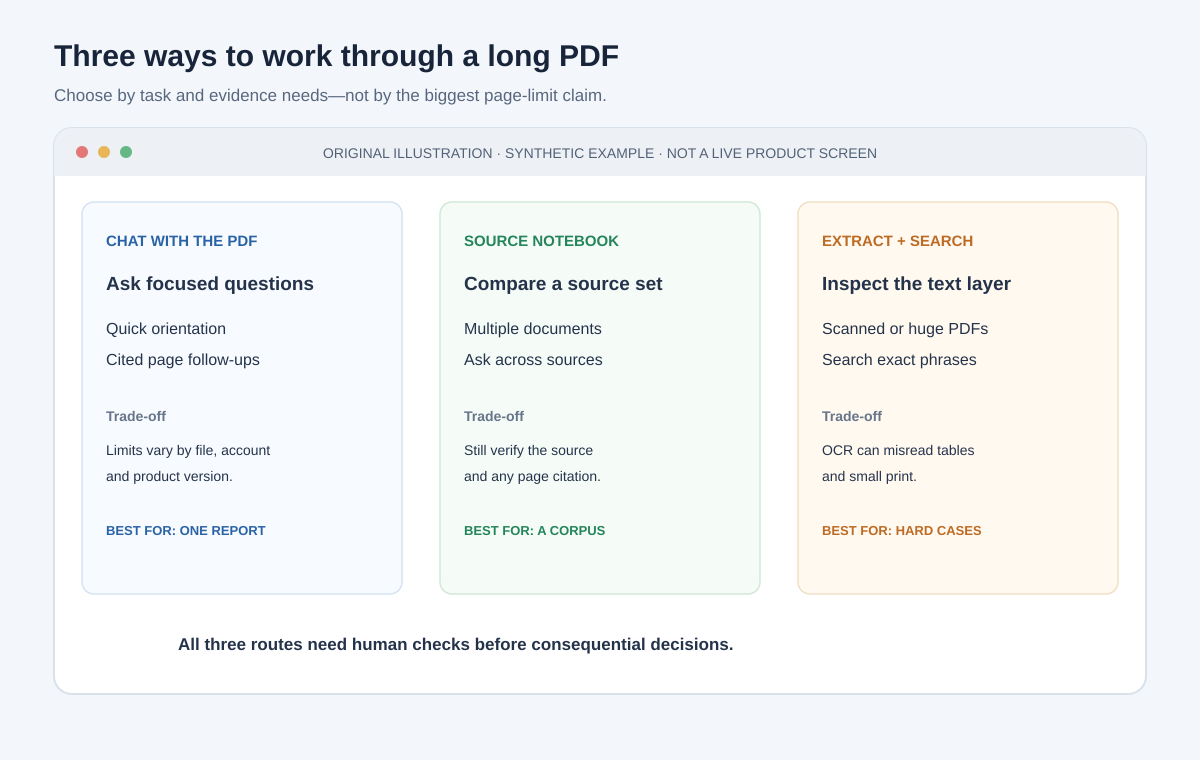
| Workflow | Best fit | What it is good at | Main limitation |
|---|---|---|---|
| Chat with one PDF | One report and a defined question | Getting oriented, locating a section, asking follow-ups | File limits vary; visual content and long inputs can be missed |
| Source notebook or document workspace | Several related reports or reference documents | Asking a consistent question across an organized source set | A source citation still needs checking; source coverage and account terms matter |
| Extract or OCR, then search/review | Scanned, badly laid out, unusually large, or table-heavy PDFs | Finding exact phrases, inspecting text, splitting a difficult file into manageable parts | OCR and extraction introduce their own errors; someone must validate the output |
| Ordinary PDF search and manual reading | A short document, an exact phrase, or high-stakes interpretation | Direct access to the original wording and layout | Slower for discovery across many lengthy sources |
These are not mutually exclusive. You might use AI to map the report, PDF search to find a number, OCR on a scanned appendix, and manual review for the conclusion. In fact, combining methods is often safer than asking one chat window to “read everything.”
Official product documentation describes different handling. OpenAI's file-upload guide notes that what ChatGPT can do depends on file contents, the selected model, and available tools. Anthropic's PDF guide describes visual analysis for PDFs up to a stated page threshold and text-only processing for larger files. Google's Gemini Notebook help center documents source-based workflows and account-specific privacy terms. These pages are product documentation, not independent accuracy evaluations; check the current page and your own account before choosing.
A Five-Pass Reading Workflow
Use the sequence below for a report that matters. It adds a little structure up front and saves time spent chasing unsupported answers later.
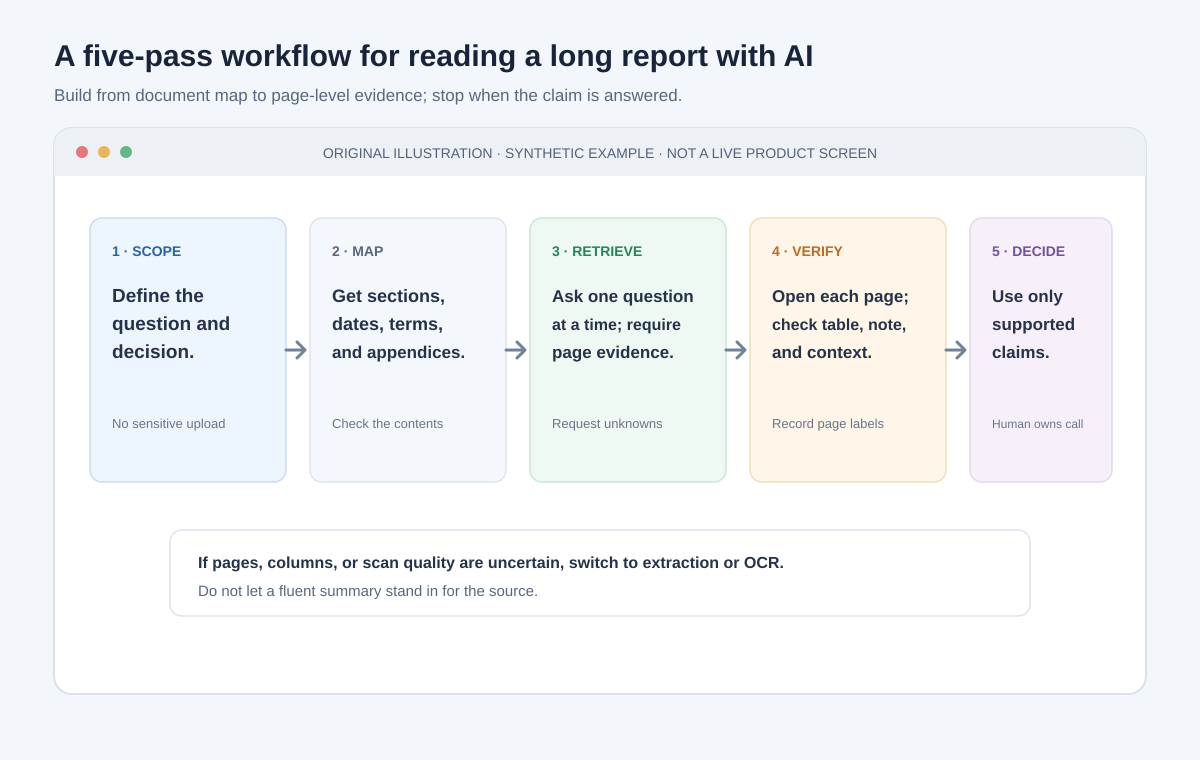
1. Name the decision and the question
Write down what you need to decide, then split it into questions the PDF can actually answer. “Is this report right?” is too broad. Better questions are: “What population did the authors study?”, “What outcome did they measure?”, and “What limitation do they state?”
If the report will inform a medical, legal, financial, employment, safety, or compliance decision, AI may help locate text, but it must not replace a qualified reviewer or the required review process.
2. Check the file before you upload it
Ask two separate questions:
- Can this tool read the file reliably? Select a paragraph and copy it into a plain-text editor. If the copied text is blank, garbled, or in the wrong order, the PDF may need OCR or a different extraction method. Inspect tables and charts visually even when body text copies cleanly.
- May this account process this file? Check your organization's policy, the specific product and account terms, retention, access, and any contractual restrictions. “Training off” is not the same as “nothing is stored” or “the tool is approved.”
If either answer is unclear, stop before uploading. Ask the document owner, use an approved environment, or test the workflow on a public or synthetic document. Google's privacy and terms for Gemini Notebook illustrate why account type and even feedback actions can affect how data is handled; read the current terms for the service you use.
3. Create a map before requesting a summary
Ask the tool to list the document's title, date, headings, major sections, appendices, and any apparent limitations. Request the PDF viewer's page numbers, not only printed page labels. Then compare the map with the table of contents and a few key pages.
For several documents, first build a source list with a short description of each file and its date. Keep the sources distinct: “Report A says…” and “Report B says…” are easier to audit than an answer that blends them into a single narrative.
4. Ask one question at a time and require evidence
Do not begin with “Tell me everything important.” Narrow the task and specify how the answer should be supported. Ask for the page, section heading, exact short quote, and any missing evidence. A quote makes a citation easier to inspect; it does not guarantee that the model copied it accurately.

Photo: Kwameghana (Bright Kwame Ayisi) / Wikimedia Commons, released under CC0 1.0.
5. Verify the claim on the page
Open each cited page. Check whether the quoted words appear, whether the citation points to the right section, and whether the context supports the answer's full wording. Inspect nearby paragraphs, table headings, footnotes, definitions, and the report's limitations.
If the AI says “the report proves X,” but the page only reports a short-term association in a limited sample, rewrite the note to reflect the evidence—or mark the claim unsupported. Do not repair a bad citation by guessing which nearby page the model meant.
A Prompt That Produces Checkable Answers
Adapt this template to the document and your approved tool:
Use only the attached report for factual claims. Answer this question: [one specific question]. For each claim, provide (1) the PDF viewer page number, (2) the section heading, and (3) one short exact quote that supports it. If you cannot find direct evidence, say “not found in the report.” Separate the authors' reported results from your interpretation. Include relevant limitations, definitions, dates, and uncertainty. Do not infer causation or generalize beyond the study population.
For a comparison, add:
Answer the same question separately for each named report. Do not combine their findings. Return one row per report with its date, population, measure, answer, page citation, and any limitation that affects comparison. If a field is missing, write “not stated.”
Ask for short evidence, not a page-long reproduction of copyrighted material. The goal is to find and check the relevant passage, not to regenerate the report.
Keep an Evidence Log
A compact log prevents a useful-looking answer from turning into an untraceable conclusion. Keep one row per important claim:
| Claim to check | Viewer page / section | Supporting passage | Your verdict |
|---|---|---|---|
| What the report measured | Page and heading | Exact phrase or table cell | Supported / partly supported / not found |
| Who or what was included | Methods or scope | Eligibility and exclusions | Supported / unclear |
| What the result means | Results and limitations | Result plus caveat | Supported / overstated |
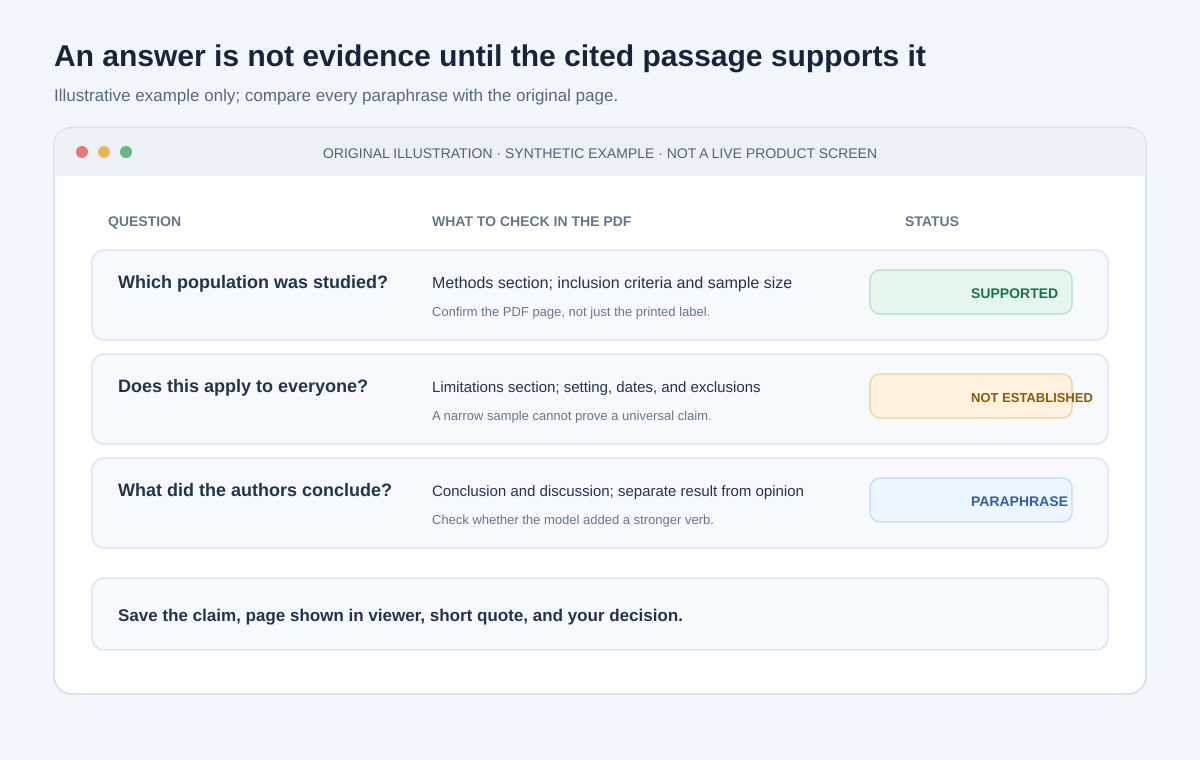
This is an original checklist graphic, not a score or measured evaluation of any AI product. For a table, record the row and column headings as well as the value; a number without its units or denominator is easy to misread.
For teams, store the document title, version or date, question, answer, page reference, reviewer, and decision. Avoid copying unnecessary personal or confidential content into the log. Follow your organization's retention rules.
Handle Scans, Charts, Tables, and Multiple Reports
Scanned pages
If a page is an image, OCR can make its text searchable. OCR is a conversion step, not a guarantee of accuracy: columns can interleave, a minus sign can disappear, and a footnote can be separated from the number it qualifies. Keep the original open beside the extracted text. Verify every figure or quotation that matters.
Tables and charts
Ask for the table's title, units, row and column labels, denominator, date range, and notes before asking for a conclusion. Then inspect the original visual. A model that reads a value correctly but misses “per 1,000 people” can still give you a materially wrong answer.
Photo: MikeRun / Wikimedia Commons, licensed under CC BY-SA 4.0.
Multiple reports
Ask for each report's result separately before requesting a comparison. Align dates, populations, definitions, units, and methods. Two percentages are not comparable just because they have the same unit label; their denominators or study populations may differ.
Use a source-grounded notebook when cross-document retrieval is the main task, but keep the evidence trail explicit. Ask the tool to identify the source file for each claim, then open both the cited passage and the original PDF. If one file is missing or unreadable, make that absence visible rather than letting the model silently fill the gap.
What the Comparison Does—and Does Not—Tell You
| If your main need is… | Start with… | Add this human check |
|---|---|---|
| “Give me a map of this report” | Chat with one PDF | Compare its outline with the contents page |
| “Find where this term is defined” | PDF search, then a targeted AI question | Read the paragraph around the match |
| “Compare three dated reports” | A notebook or separate source queries | Check dates, definitions, and page citations in every file |
| “Read a scanned appendix” | OCR on a copy, then a focused question | Compare OCR text with the original image |
| “Confirm a table value” | Open the table in the PDF or a reliable extracted copy | Verify units, headers, footnotes, and calculations |
| “Support a consequential decision” | The approved research process and a qualified reviewer | Use AI only as a navigation aid unless policy says otherwise |
The right choice depends on the job, not a universal tool ranking. Page limits, supported formats, account protections, and visual capabilities change. Consult the current OpenAI file guide, Claude file guide, and Gemini Notebook help before uploading or deciding a product is suitable. For risk management in an organization, NIST's AI Risk Management Framework offers broader guidance; it is not a product certification.
Common Mistakes to Avoid
- Uploading first and defining the question later. Decide what you need before exposing a file or granting a connected tool access.
- Trusting the first summary. Use it to orient yourself, then ask for specific claims and inspect their sources.
- Accepting a citation because the page number looks plausible. Verify the passage and context yourself.
- Treating a model's silence as proof of absence. “I didn't find it” may mean it missed a section, a scan, or a differently named term. Search the PDF directly.
- Comparing reports without aligning definitions. Confirm who was counted, which period was covered, what outcome was measured, and how missing data was handled.
- Assuming OCR fixes the document. It creates a searchable representation that may contain recognition errors. Validate it.
- Using an answer outside its evidence. A summary is not a substitute for expert interpretation or required organizational review.
A Five-Minute Checklist
Before you rely on an AI answer about a long PDF:
- Is this exact document and account approved for the task?
- Can the tool read the text, tables, and pages I need?
- Did I ask a specific, answerable question?
- Did the answer identify the source file, viewer page, section, and supporting passage?
- Does the passage actually support the complete claim?
- Did I check definitions, units, table notes, dates, and limitations?
- Is a human reviewer required before acting?
If a citation fails one check, downgrade or discard the answer. The most useful AI response is not the most confident one: it is the one that makes it easy to find out what the document really says.
Sources and Further Reading
- OpenAI: Uploading files to ChatGPT — supported file types and factors that affect file analysis.
- Anthropic: Upload files to Claude — document formats, PDF processing, and current file limits.
- Google: Gemini Notebook Help Center and Privacy and Terms of Use — source workflows and data-handling details.
- Liu et al. (2023), “Lost in the Middle: How Language Models Use Long Contexts” — research on position-sensitive retrieval in tested long-context models.
- NIST AI Risk Management Framework — general organizational risk-management guidance.