
A Fast Prototype Is Not Yet a Safe Product
Prompt-to-app tools can produce a polished sign-in screen, a database-backed dashboard, and a working deployment in a fraction of the time a traditional project might take. That speed changes how software starts; it does not change what a production app must get right. A button can look finished while its server action trusts a value supplied by the browser. A table can appear private in the interface while its database allows a broader audience to read it.
This guide is a practical vibe coding security checklist for apps built with Lovable, Bolt, Replit, or similar AI app builders. It is for founders, makers, small teams, and developers preparing a web app for real users. The focus is on the most important pre-launch questions: what data the app handles, who can reach it, where credentials live, how to test the result, and what to do when something goes wrong.
The interface examples and screenshots in this guide are original illustrations with fictional data, not captures of a vendor product. Product features and navigation change; use the linked official documentation for current details. This is general educational information, not a penetration test, legal opinion, or substitute for a qualified security review.

Photo: William Iven, “Woman typing at a computer (Unsplash),” via Wikimedia Commons, CC0 1.0.
Start by Deciding What You Are Actually Launching
“It is just a small app” is not a security scope. A no-login calculator and a customer portal with billing, personal records, and staff administration have very different consequences if they fail. Before asking an AI builder to review code, write down the app's purpose and release boundary.
Answer these questions in plain language:
- Who will use it? The public, invited customers, employees, administrators, or a combination?
- What information will it store or send? Include account details, uploaded files, messages, analytics, support logs, and data sent to AI or payment services.
- Which actions matter? For example: create an account, change an address, invite a user, approve a purchase, export a report, or delete a record.
- What is deliberately out of scope? Identify features that are demos, disabled, or not ready. A visible control should not imply a feature is safe to use if it is not.
- How will you recover? Name who can disable the app, revoke a key, restore a backup, and contact a provider.
| Release type | Typical data and impact | Minimum sensible review |
|---|---|---|
| Throwaway prototype | Fictional records; not used for real decisions | Keep it isolated, use fake credentials, avoid public links, and delete it when done |
| Private internal tool | Employee or business information; limited users | Review account access, authorization, logs, backups, and who can publish |
| Public app | Public visitors; possibly accounts, uploads, or transactions | Test anonymous and signed-in behavior, data boundaries, dependencies, monitoring, and recovery |
| Sensitive or high-impact app | Health, financial, children’s, legal, employment, or safety-related data and decisions | Pause for qualified security, privacy, and compliance review before launch |
If you cannot identify the data, users, and action owners, you are not ready to make the project public. That is a useful outcome of the review—not a reason to ask the builder to “finish everything” in one prompt.
Map the App Before You Run a Security Scan
Write a small data-flow map. Include the browser, your application code, the database, file storage, authentication, payment services, email providers, analytics, AI APIs, and any external integrations. Mark which components see personal data or credentials. A simple sketch can expose a dependency you did not know had been created.
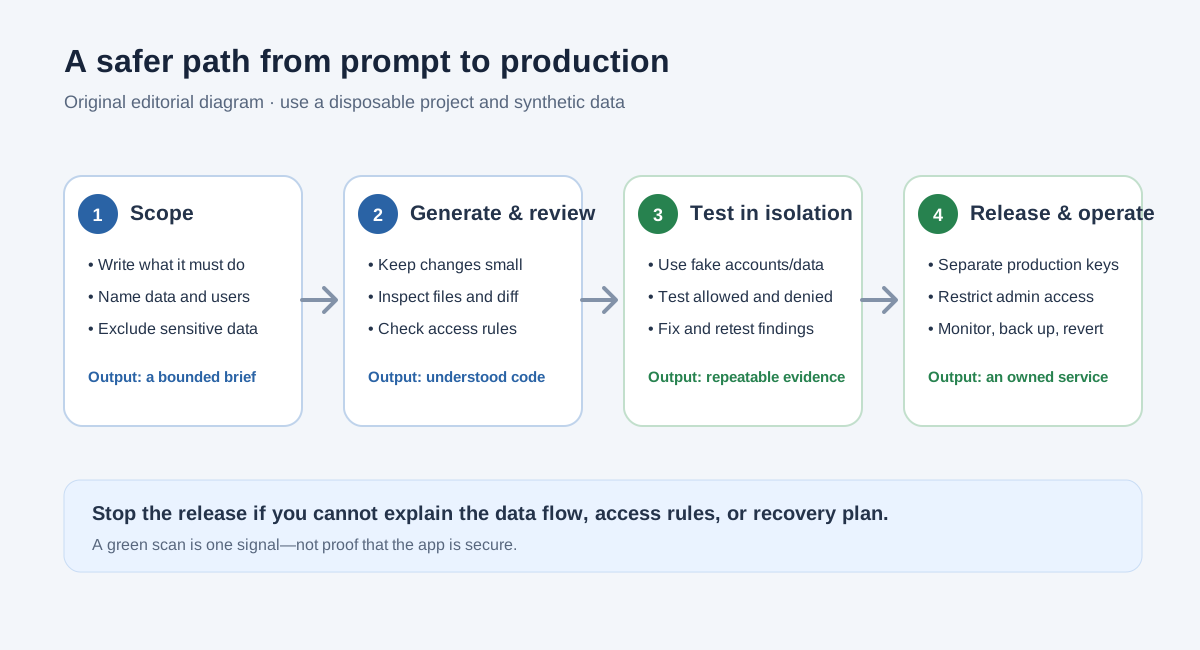
A security review is a sequence of evidence-producing gates, not a single “secure” button.
Make an inventory for each data type:
| Data | Where it enters | Where it is stored | Who should access it | How to remove or restore it |
|---|---|---|---|---|
| Email address | Sign-up form or invitation | Authentication provider and possibly app profile | Account owner; narrowly defined support access | Account deletion and documented retention process |
| Customer note | Form or import | Database | The owning customer and approved staff, if needed | Record deletion, backup retention, and restore procedure |
| Uploaded file | Browser upload | Object or file storage | Owner and explicitly authorized viewers | Delete access, retention period, backup handling |
| Payment status | Payment provider event | Server-side record | Server logic and limited administrative roles | Reconcile against provider records; do not trust a browser flag |
| API credential | Platform secret manager | Encrypted provider-managed storage | Runtime server component; authorized maintainers | Revoke and replace in the external provider |
Do not put real customer records in an AI prompt just to get a more realistic test. Create fictional names, addresses, files, and transactions. Remove secrets from screenshots and screen recordings. If a connected service has production data, start from a test or sandbox account when it is available.
Separate a Helpful Scan from a Complete Security Review
Run the app builder’s built-in checks, but read their scope and limitations. Products may use “security scan,” “audit,” or “advisor” to describe different checks. A database advisor is not necessarily a source-code review; a source scanner is not a backup-restore test; a green badge is not proof that the app’s business rules are correct.
The following comparison is based on vendor documentation checked on November 9, 2026. Features, names, plan availability, and navigation can change. Confirm the current behavior inside your account and the official docs before relying on it.
| Builder | Documented security tools to look for | What you still need to verify |
|---|---|---|
| Lovable | Quick security scan for common database, dependency, and configuration findings; Deep security scan for app-specific code, permissions, endpoints, input handling, credentials, and related risks | Review the exact findings and current scan status; test your own data rules, connected services, deployment settings, and recovery |
| Bolt | Project security audit covering code and database, plus a separate database security check | Read action items and verify changes yourself; confirm external services, production settings, and workflows outside the audit’s documented coverage |
| Replit | Secrets tool for storing credentials as encrypted environment variables rather than hard-coding them | Secret storage is not the same as authorization or a whole-app security review; verify deployment-specific settings, database rules, authentication, and any scans available to your project |
Official references: Lovable security overview, Lovable project security view, Bolt project security audit, Bolt database security settings, and Replit Secrets.
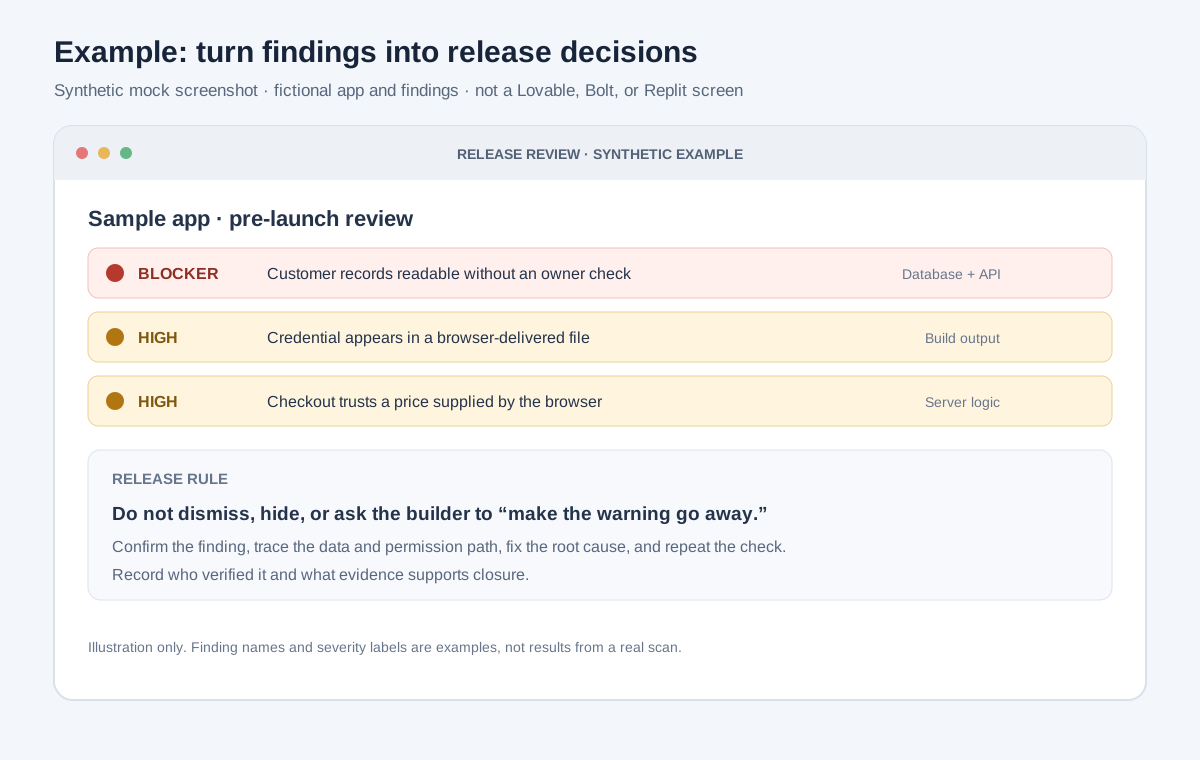
Illustrative mock screenshot. These findings are fictional and are not from a real Lovable, Bolt, or Replit project.
For every finding, capture four things: what the tool reported, whether it applies to your app, the root cause, and how you verified the fix. If a finding looks wrong, do not simply dismiss it. Confirm the relevant code, configuration, or data rule, document why the behavior is intentional, and test that the exception does not grant broader access than intended.
Protect API Keys, Tokens, and Other Secrets
Credentials are a frequent failure point in AI-generated apps because a prototype often connects to third-party services early. The key distinction is where code runs. Browser code is delivered to visitors. A value embedded in a browser bundle, HTML page, public repository, or browser request is not private, even if the interface hides it or the project started as private.
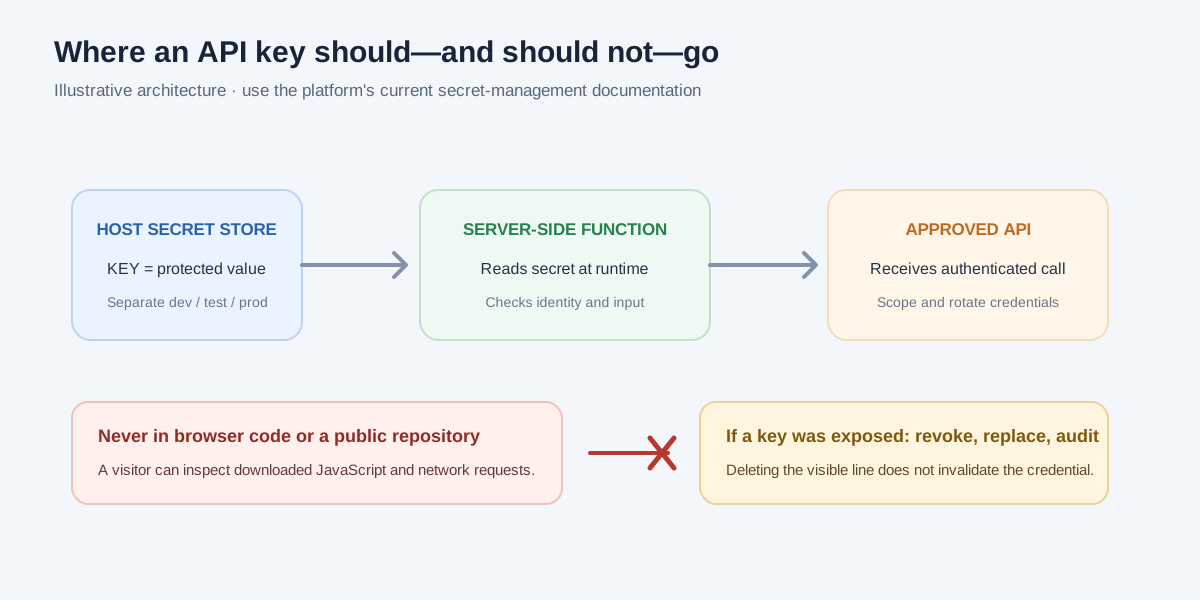
Keep private credentials on the server side. Names beginning with NEXT_PUBLIC_ or VITE_ are commonly intended to be exposed to browser code; check your framework’s exact behavior.
Use this secret-handling checklist:
- Store private keys, signing secrets, database passwords, and access tokens in the platform’s secret manager or another approved secrets service.
- Read a private secret only from a server-side route, server function, or backend process that needs it. Return only the minimum result the browser needs.
- Keep separate credentials for local development, testing, and production. A demo key should not be able to access production customer data.
- Restrict each credential to the specific service, project, permissions, and usage limits it needs, where the provider supports that.
- Review generated configuration and browser network requests for accidental exposure. Check source files, built assets, error output, logs, and Git history—not only the visible editor.
- Avoid pasting secrets into AI prompts, issue trackers, screen recordings, public templates, and support messages.
- If a secret may have been exposed, revoke it at the service that issued it. Remove the old reference, issue a replacement, and review provider activity for use you do not recognize.
Deleting a key from the latest version does not make an exposed key safe again. If it entered a public repository or browser bundle, assume it may have been copied. Rotate it first; repository cleanup is a separate step.
Check Authentication and Authorization Separately
Authentication answers, “Who is signed in?” Authorization answers, “What may this identity do to this specific resource?” A polished sign-in page does not prove that a user is allowed to see a record. Hiding an edit button does not stop a direct request from reaching an endpoint or database.
For each sensitive action, verify the rule at a trusted server or data layer:
- Can an anonymous visitor read, add, edit, or delete anything?
- Can a signed-in user read only the records their account is permitted to see?
- Can one user change another person’s profile, file, message, or order by changing a record identifier?
- Are administrative actions restricted to an explicitly authorized role?
- Does signing out end access to protected pages and actions?
- Do account recovery, email changes, invitations, and role changes have appropriate confirmation and audit behavior?
- Are database row-level security or equivalent record rules enabled wherever the design depends on them?
Build a role matrix before writing policies. Here is a deliberately small example:
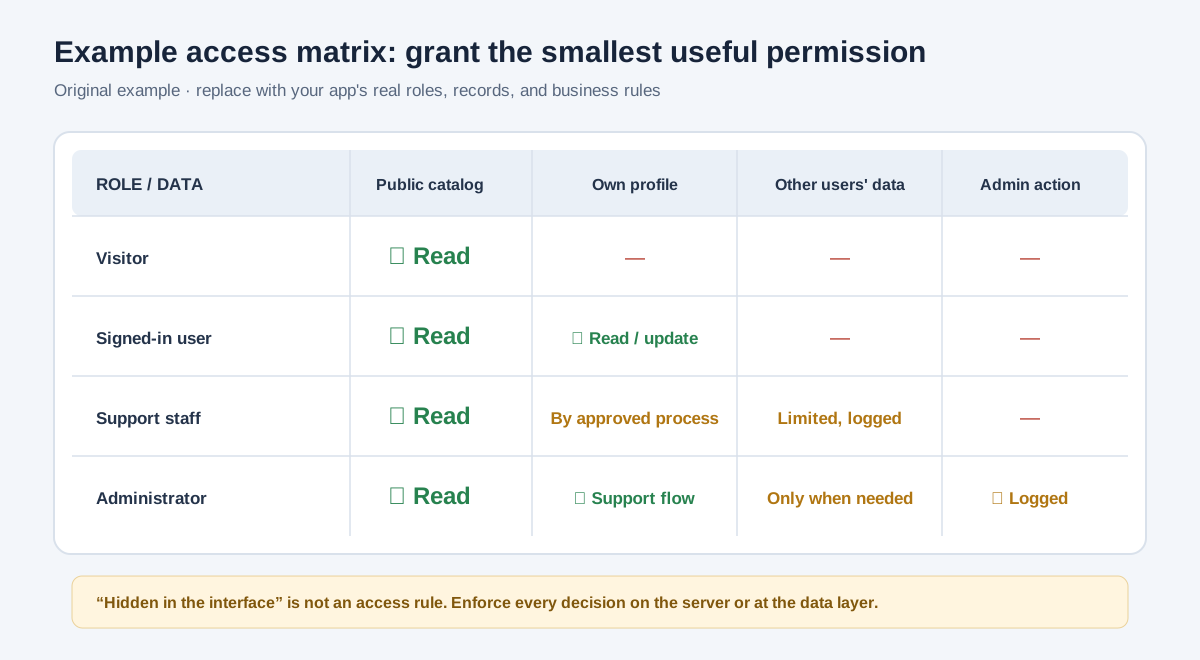
Original example authorization matrix. “Support staff” access should be limited, justified, and logged—not a universal bypass.
Then test both allowed and denied outcomes with separate synthetic accounts. For example, sign in as sample user A, create a sample record, and confirm user B cannot view or modify it. Use a disposable test environment and data you own. Do not test against other people’s accounts or systems.
If the app uses a managed database, inspect the actual policies, not just the builder’s explanation of them. A policy that says “authenticated” may permit every signed-in user, while your product may require “the authenticated owner of this row.” Public access can also be intentional—for example, reading a public product catalog—but write, update, and delete permissions deserve separate decisions.
Review Forms, Uploads, and AI Features
Treat every value from a visitor, integration, uploaded file, or model response as untrusted until the server validates it. The user interface can guide people and catch mistakes, but it is not the security boundary.
For forms and APIs:
- Validate type, length, format, and allowed values on the server.
- Apply sensible size and rate limits to requests and uploads.
- Use parameterized database operations or the framework’s safe query mechanisms. Do not build database commands by joining raw user input.
- Encode output appropriately for the context where it is displayed.
- Return helpful errors without exposing stack traces, secrets, internal prompts, database details, or whether a specific account exists.
- Check that actions that should happen once—such as applying a credit or redeeming an invitation—cannot be repeated to produce an unintended result.
For file uploads, decide which types the app truly needs, enforce maximum sizes, use generated storage names rather than trusting submitted paths, and set access rules for each file. A file-picker restriction in the browser is helpful UX, not a complete server-side validation rule. Do not make a private bucket public just to simplify previews.
If the app uses an AI model, ask: what user data is sent to the model provider? Can a user cause the model to reveal another user's data, call an action they should not be able to use, or create an output that your app treats as trusted instructions? Keep model credentials on the server, limit tools and data to the task, and require human approval before consequential or irreversible actions. Never treat a model response as proof that an authorization check passed.
Make Payments and Business Rules Server-Side
Payment and subscription features need special attention because generated screens can look complete before the server-side flow is. The browser may show a price, order state, or “paid” badge; those display values are not proof that a transaction succeeded.
Before taking a real payment, check that:
- The amount, currency, product, and discount are determined or verified by trusted server-side logic.
- The app confirms payment state through the payment provider’s documented server-side flow, not only a redirect or client-side event.
- Webhook or callback events are verified according to the provider’s instructions and handled safely if delivered more than once.
- A user cannot obtain a paid feature simply by editing a browser value or calling an unprotected route.
- Test mode and production credentials are clearly separated.
- Refunds, cancellations, failed payments, and support escalation have an owner and a tested process.
If you cannot explain the path from order creation to provider confirmation to fulfillment, do not accept live payments yet. Use a provider sandbox and fictional orders while building.
Inspect Dependencies, Integrations, and Generated Changes
AI builders may add packages, scripts, integrations, routes, or database objects without making each implication obvious. Review the project diff after meaningful changes. Ask what changed, why it is required, and how to remove it. Do not accept a large rewrite merely because the preview looks right.
For dependencies and integrations:
- Review new packages and their maintainers, purpose, current versions, and known advisories using the package manager and vendor checks available to you.
- Remove abandoned or unused packages rather than carrying them into production.
- Review OAuth scopes and connected-service permissions. A connection should get the smallest useful access, not an unrestricted token by default.
- Look for externally reachable routes, server functions, webhooks, and administrative pages; confirm each has an intentional access rule.
- Check the app’s content security, cross-origin, and deployment settings against the hosting provider’s documentation instead of copying a configuration from an unrelated example.
- Keep source control enabled where possible, and review changes before deploying. Preserve a known-good version so you can roll back.
The OWASP Top 10 is a useful orientation to common web application risks, but it is not a checklist that certifies an app. Use a standard such as the OWASP Application Security Verification Standard when you need a more systematic set of requirements.
Test Safely Before the Public Release
Use a staging or preview environment that is separate from production wherever possible. Give it test credentials and synthetic data; confirm it cannot accidentally send real customer emails, charge a card, or write to a production database. A preview URL can still be public or shareable, so check who can access it and what data it contains.

Photo: Jeff Sheldon, “Overhead desktop workspace (Unsplash),” via Wikimedia Commons, CC0 1.0.
Use a simple test matrix:
| Test identity or state | What to verify | Example evidence |
|---|---|---|
| Anonymous visitor | Public pages work; private data and privileged actions remain unavailable | Test result, route, and redacted screenshot |
| User A | Can complete intended tasks with their own synthetic data | Test case and record identifier from the test environment |
| User B | Cannot read or change User A’s private records | Denied result and the rule that enforces it |
| Administrator | Can perform only documented administrative actions | Role assignment, audit event, and expected result |
| Signed-out session | Protected actions stop working after logout or expiry | Re-test result after ending the session |
| Invalid or oversized input | The server rejects it safely and does not expose internals | Response summary with sensitive values removed |
| Provider unavailable | The app fails safely and does not report a false success | Test-mode result and expected fallback |
| Backup copy | Restore works and the app can use the restored data | Dated restore record and responsible owner |
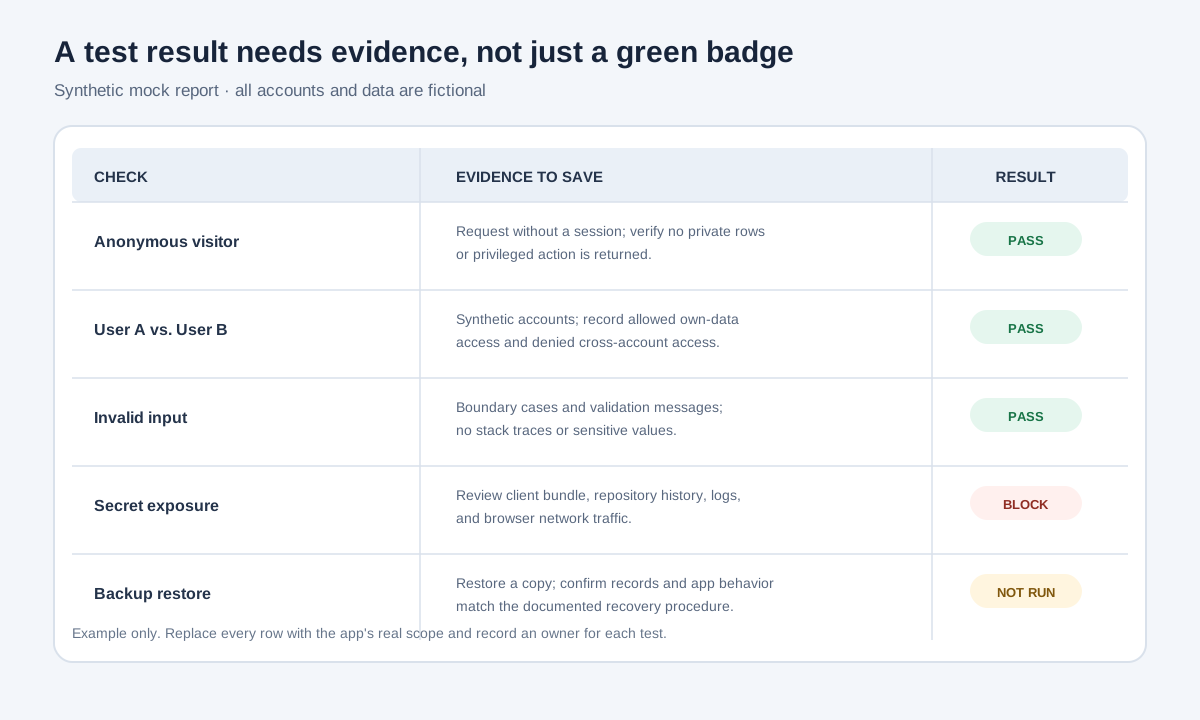
Illustrative mock screenshot with fictional accounts. A failed or not-run check is a reason to pause, not a reason to relabel it “pass.”
When a test fails, fix the root cause, then repeat the same test and any neighboring cases that could be affected. Save concise evidence: what you tested, with which synthetic role, what you expected, what happened, and the date or app version. Redact personal data, access tokens, and secret values from test captures.
Decide Which Findings Block the Release
Not every warning has the same impact, but “the scanner found nothing” is not a release policy. Make decisions based on the data, the affected users, the ease of unintended access, and what could happen if the behavior is abused.
| Finding or uncertainty | Default release decision |
|---|---|
| Private records appear available to the wrong users | Block release until the boundary is fixed and retested |
| A private credential is in browser code or public history | Block; revoke it, replace it, review usage, then retest |
| Payment state or important permissions are trusted from the browser | Block live use until enforced and verified server-side |
| A critical feature has no owner, backup, or recovery procedure | Keep the app in staging until ownership and recovery are tested |
| A scanner warning may be intentional public behavior | Verify the exact data and actions exposed, document the reason, and test the boundary |
| A low-impact issue has a clear workaround and owner | Document, assign a due date, and confirm the residual risk is acceptable |
| You do not understand a finding or cannot reproduce expected behavior | Pause and get help; uncertainty is not evidence of safety |
Do not let a builder silently change permissions or rewrite security-sensitive code without review. For each automated fix, inspect the changed files or settings, rerun the relevant check, and rerun the behavior test. A fix that passes one scan can still break legitimate users or leave another path open.
Before You Publish: A One-Page Checklist
Scope and data
- I can name the app’s users, data types, and important actions.
- I have removed real customer data from prompts, demos, and test accounts.
- I know which providers receive data and why.
- Sensitive, regulated, or high-impact use has had an appropriate professional review.
Code and permissions
- I reviewed the generated changes and can explain the parts I am releasing.
- Every private record and sensitive action has a server-side or data-layer authorization rule.
- I tested expected and denied behavior with at least two synthetic users.
- Forms, uploads, and external inputs are validated on the server.
- Administrative actions are limited and, where appropriate, logged.
Secrets and services
- No private key or token is in browser code, screenshots, public Git history, or AI prompts.
- Production secrets are stored with the deployment platform or an approved secrets service.
- Development, test, and production credentials are separated.
- I reviewed new packages, OAuth scopes, database policies, and external integrations.
Release and operations
- I ran the platform’s current security checks and reviewed their coverage.
- I fixed or documented each finding and verified any automated fix.
- I tested the deployed preview using fictional data and non-production credentials.
- I know how to monitor errors, revoke a credential, disable a feature, roll back, and contact the providers.
- A backup exists and I have tested restoring it.
- Someone owns patching, access reviews, and support after launch.

Photo: Damian Patkowski, “Workspace (Unsplash),” via Wikimedia Commons, CC0 1.0.
Monitor, Maintain, and Plan for Recovery
Security work continues after launch. Remove access when a collaborator no longer needs it. Review logs for unusual errors and authentication patterns without collecting more personal information than necessary. Apply updates, rerun checks after meaningful changes, and keep a record of the app version that was reviewed.
Write a short incident plan before you need one:
- Contain: Who can unpublish or disable the affected feature?
- Credential response: Who can revoke and replace exposed API keys or sessions?
- Data response: How will you determine which records or users may be affected without exposing more data?
- Recovery: Where is the backup, who can restore it, and how is the restore tested?
- Communication: Which provider, customers, or internal contact should be notified, and who makes that decision?
- Learning: How will you fix the root cause and verify the same issue cannot return through a related route?
Keep the plan proportional. A hobby project may need a small checklist and a recoverable copy; a customer-facing business app may need documented roles, monitoring, support coverage, and expert review.
The Safest Way to Vibe-Code Is to Keep the Human in the Loop
AI app builders can shorten the distance from idea to working software. The responsible way to use that speed is to keep each change small enough to understand, use test data, enforce permissions where the app processes requests, and verify the result independently. Platform security features can help you find mistakes faster, but they cannot decide whether your product’s data rules are correct or own the consequences of a release.
If you remember only one thing, make it this: do not launch a feature whose data flow, access rules, and recovery path you cannot explain. Start small, make evidence part of the build, and pause for qualified help when the potential impact is more than a prototype can safely absorb.