
AI Can Help You Build—But It Cannot Own the Result
You have an idea for a tiny tool: a page that tracks books you want to read, a timer for focused work, or a script that renames your own photos. An AI coding assistant can turn that idea into a first draft remarkably quickly. It can also produce a project that looks finished while hiding a broken button, a leaked secret, or a feature you never asked for.
That tension is the useful way to think about AI-assisted coding in 2026. These tools lower the cost of trying an idea and make code easier to ask questions about. They do not make the result correct, secure, maintainable, or yours to publish. The skill is not getting the AI to write the most code. It is learning to direct small changes and prove that each one works.
This guide is for beginners who want to build something real without treating the assistant like an infallible developer. We will cover the main kinds of tools, how to choose a first project, a repeatable coding workflow, common failure modes, and a practical safety checklist.
For a hands-on example, see our product-neutral walkthrough for building and testing a tiny unit converter.
What Counts as an AI Coding Assistant?
The phrase covers several kinds of software, and the boundary between them is blurring. A tool may offer more than one mode, so look at the actions it can take—not just its marketing label.
- Chat-based helpers answer questions and draft snippets you copy into your editor. You decide what gets saved or run.
- Editor assistants can explain or suggest changes in the files you are working on. Some offer inline suggestions; others can edit a selected set of files.
- Repository-aware assistants can inspect more of a project and propose multi-file changes. Their broader context can help, but it also makes reviewing their scope more important.
- Coding agents can plan and take multiple steps, such as editing files and running commands. Depending on the product and settings, they may ask for approval or act with less supervision.
- Prompt-to-app builders generate a website or prototype from a description. They are convenient for exploring an idea, but the generated project still needs testing, review, and a plan for ownership and maintenance.
An assistant that only explains a function has less ability to affect your computer than an agent allowed to run shell commands. Before you begin, find out what files it can read, whether it can access the internet, what it sends to a service, and which actions require your approval. Our AI agents guide covers the broader distinction between suggestions and autonomous actions.
Pick a First Project That Is Small Enough to Finish
The best first project is not the most impressive idea. It is one where you can tell whether the result is right. Choose a task with a narrow purpose, visible behavior, and no meaningful consequences if you throw it away.
Good starter ideas include:
- A static page that organizes a personal reading list.
- A unit converter with a few clearly defined conversions.
- A local checklist that saves data in the browser.
- A script that renames copies of sample files in a temporary folder.
- A small quiz that checks answers you already know.
For a first project, avoid real payments, private user accounts, medical or financial decisions, workplace data, and anything that controls a device or deletes important files. Avoid publishing a form that collects other people's information before you understand how that data is stored and protected.
Write down what “done” means in plain language. For a reading list, that might be: “I can add a title, see it in a list, mark it finished, and remove it. If I refresh the page, the saved list is still there.” This is specific enough to test and small enough to discuss one piece at a time.
Choose a Tool by Its Boundaries, Not Its Hype
There is no universal best assistant for every beginner. Tools differ in interface, model, cost, privacy terms, supported languages, context, and how much they can do without you. Features and terms change, so check the current product documentation before committing your project or data.
Use these questions to compare options:
- Where will you work? A chat window may be enough for learning a concept. An editor-based tool can be more convenient when you need help across project files.
- What can it access? Understand whether it can read one selected file, the whole workspace, connected services, or your terminal.
- When does it ask first? Prefer clear review and approval controls for edits, command execution, network access, and other consequential actions.
- What happens to your input? Read the current data-use, retention, and training settings. Our AI privacy guide explains why an opt-out from training is not the same as keeping data on your device.
- Can you inspect and keep the project? Check whether you can export the files, use version control, and continue without the service.
- What does it cost when you actually use it? Review limits, paid features, and usage-based charges before relying on a workflow.
For learning, an assistant that explains its suggestions and lets you review a small change is often more useful than one that completes a whole app in one shot. You can also use a regular chatbot as a tutor; see our guide to using AI chatbots effectively.
The Build–Review–Test Loop
Keep each request short enough that you can understand its effect. A reliable loop has five steps:
- Describe one outcome. State what should change and what should stay the same.
- Ask for a plan. For a change touching multiple files, ask which files need changes and why before asking the tool to make them.
- Review the diff. Look at every added, deleted, or modified line. Ask about unfamiliar code rather than approving it blindly.
- Run the project and relevant checks. Try the behavior you asked for, including an ordinary case and an error or empty case.
- Keep or undo deliberately. Save a known-good version before the next change. If something breaks, return to the last working state and isolate the cause.
This process is more than caution: it makes errors easier to locate. If you ask for five features at once and the app stops working, you have five possible causes. If you add one small feature, test it, and then continue, the source of a failure is much clearer.
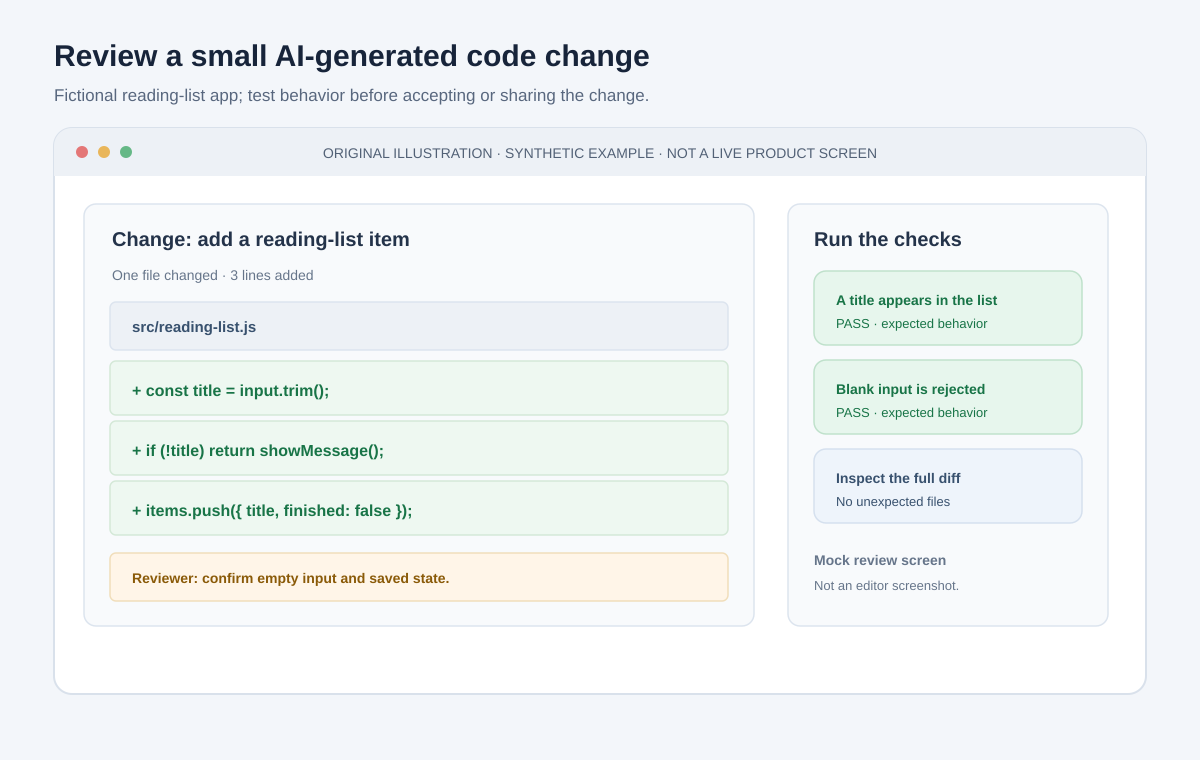
Original mock screen with sample code, not a screenshot of a specific editor or project.
Write Prompts That Keep the Work Manageable
An assistant cannot infer all the important details from “make me an app.” Include the purpose, current state, limits, and how you will verify the result. Ask it to tell you when it needs information rather than inventing a requirement.
For example:
I am making a local reading-list page for personal use. The page already displays a list from sample data. Add a form to enter a title and add it to that list. Do not add accounts, a server, external packages, or any network calls. First explain which file you plan to change. After the change, tell me how to test a normal title and an empty title. Do not change anything else.
That prompt is intentionally constrained. You can improve it by sharing the relevant file or error message, but only if you are allowed to share that material with the service. Do not paste an entire repository when one small file and the exact symptom are enough.
When a request is ambiguous, answer questions before the assistant edits. Useful follow-up requests include:
- “Explain this change in beginner-friendly terms before applying it.”
- “Show me the smallest fix, and list any behavior it might change.”
- “Do not add a package unless you explain why the project needs it.”
- “What could fail for an empty input or an unexpected value?”
- “Which tests or manual steps would demonstrate that this works?”
Asking for fewer lines is not the same as asking for simpler code. Ask for an approach that fits the project’s existing patterns and that you can maintain.
Verify the Result Instead of Trusting the Explanation
An AI answer can be fluent and wrong. Generated code may call a function that does not exist, use an old API, mishandle a boundary case, or solve a different problem from the one you described. Verification means checking behavior, not asking the same assistant whether its own answer is correct.
For each change, use the checks that fit the project:
- Start the app and confirm it launches without errors.
- Exercise the feature using the success case you requested.
- Try an edge case such as missing input, a long value, or an empty list.
- Read the browser or terminal error if something fails; give the tool the exact message and ask it to explain the likely cause before changing code.
- Run the project’s existing tests and checks when available.
- Inspect the final diff to see whether the tool modified files outside the agreed scope.
Tests are useful but not magical. A test can be wrong or miss a failure. If your project has no tests, write down a handful of manual checks and repeat them after changes. For a form, for example, check a typical value, a blank value, a duplicate value, and the result after refreshing.
Do not treat a green check mark, successful build, or polished preview as proof that the whole project is secure. Each check answers a limited question. A build can succeed while a feature behaves incorrectly; a test can pass while the test never covers the risky path.
Protect Your Code, Accounts, and Data
The assistant may see more than the prompt you typed. An editor integration could send selected code or surrounding files to a service; an agent might read files or run commands. Before using one, check its permissions and data settings.
Follow these rules from the start:
- Never share secrets. Do not include passwords, private keys, access
tokens, recovery codes, or the contents of a
.envfile. If a key was exposed, revoke and replace it; deleting it from the visible prompt may not remove stored copies. - Use fake or sample data. Replace customer details, personal records, internal documents, and real account information with examples.
- Keep work code in approved tools. If code belongs to an employer, client, school, or another person, follow its rules before sharing it externally.
- Limit access. Do not grant a tool your whole drive, account, or terminal when a selected folder or read-only explanation will do.
- Pause before consequential actions. Review commands that install packages, delete files, change permissions, access the network, publish a site, or modify an account.
- Use a separate test project. Make experiments in a folder with copies and sample data, not the only copy of important work.
An agent can be manipulated by instructions hidden in content it reads, such as a web page or document. Treat material from outside the project as untrusted input, and do not let an agent execute instructions from it or use credentials on its behalf without your direct review. This is one reason to keep permissions narrow and require approval for actions that can affect your files or accounts.
Understand Dependencies and Licensing
When an assistant suggests installing a package, it is adding code maintained by someone else to your project. Before accepting, ask what the dependency does and whether the project actually needs it. Check the package name and source; a similar-looking name is not proof that it is the intended package.
Dependencies can change the project’s security, maintenance burden, and license obligations. Generated code can also resemble existing code or include material under terms you did not expect. The assistant is not a reliable license checker and its assurance is not legal advice. For a personal experiment, keep track of where code and packages came from. For commercial or public work, check your organization’s policy and the licenses of the code and dependencies you distribute.
Common Beginner Traps
Asking for the whole app at once
A single large prompt encourages the tool to invent missing decisions and produce many changes at once. Start with the smallest working version, then add one behavior per request.
Accepting code you cannot explain
You do not need to understand every programming concept before writing a first line. But if you cannot explain what a change does, ask for a walkthrough or a smaller alternative before keeping it. This matters most for login, permissions, payments, data storage, and security-sensitive code.
Fixing errors by piling on more code
When a feature breaks, do not repeatedly ask for another patch without checking the previous one. Save the error, identify what changed, and return to the last working version if needed. Otherwise each attempted repair can make the problem harder to diagnose.
Confusing a prototype with a finished product
A generated screen can look convincing while lacking validation, accessibility, data protection, backups, or ongoing maintenance. A public app needs more than a successful preview: it needs a plan for updates, support, and what happens when things go wrong.
Giving the tool broad permissions to save time
Convenience can hide impact. An assistant that can write files or run commands should not automatically be trusted to delete, publish, or change accounts. Give it only the access needed for the current task and read each approval prompt.
A Beginner's One-Week Practice Plan
You do not need to build a polished product to learn. A few short sessions with the same small project teach more than a giant generated app.
- Day 1 — Describe and sketch. Write down the problem, who the tool is for, and three things it must do. Draw a rough screen.
- Day 2 — Make a static version. Build just the visible page with sample content. Learn how to start it and where the files live.
- Day 3 — Add one interaction. Ask for one small behavior, review the change, and test it.
- Day 4 — Handle mistakes. Try empty, unusual, and repeated inputs. Ask the assistant to explain the behavior before suggesting a fix.
- Day 5 — Save a known-good copy. Learn the basics of version control or make a dated backup. Change one thing and practice restoring it.
- Day 6 — Review quality. Check labels, keyboard use, error messages, and whether the app stores anything. Remove features you do not need.
- Day 7 — Decide what comes next. Keep the project local, share it with a trusted person, or learn deployment basics. Do not publish until you understand what data it collects and what needs maintenance.
The target is not a finished startup in a week. It is a small project you can run, explain, test, and safely change. Those habits carry over to every future tool and codebase.
When to Get Human Help
Get a qualified developer or security reviewer before relying on AI-generated code for sensitive information, payments, authentication, business-critical work, or public services used by other people. If you are working on an organization’s software, follow its review, privacy, and deployment process.
Human review is especially important when a mistake could expose data, lock someone out, lose money, or be difficult to undo. The assistant can help you prepare a clear description of the feature and questions for a reviewer; it cannot take responsibility for the outcome.
The Bottom Line: Use AI as a Pair, Not a Shortcut
AI coding assistants make it easier to try, learn, and iterate. They are most useful when the project is small, the request is clear, and you remain able to inspect and test the result. They are least trustworthy when asked to make high-stakes decisions, handle secrets, or deliver a complex app that nobody will review.
Start with a harmless project. Ask for one change at a time. Read the diff, run the code, and keep a way back to the last working version. The assistant can help you write software; the judgment about whether it should be trusted is still yours.