Start with the Claim, Not the Confidence
An AI answer can be useful and still contain a mistake. The practical question is not whether AI is always right or always wrong. It is whether the specific statement you plan to use is supported well enough for the decision you are making.
This guide gives you a repeatable check: extract the claim, identify evidence that could establish it, inspect that evidence, and record the limits. It uses a deliberately simple Windows example so you can see what verification looks like without treating an invented chatbot response as a real test result.

A Worked Example: Does Flushing DNS Remove Malware?
Imagine an AI assistant answers:
“Run
ipconfig /flushdns; malware is stored in the DNS cache, and this command removes it.”
It sounds specific, includes a real command, and offers a quick fix. Split it into separate claims before acting:
| Claim | What would verify it? |
|---|---|
ipconfig /flushdns clears the DNS client cache |
Microsoft's documentation for the command |
| Malware is stored in that cache | A technical explanation or security documentation describing this mechanism |
| Clearing the cache removes malware | A reliable malware-removal procedure or a test showing the infection is removed |
Microsoft's ipconfig reference says /flushdns flushes and resets the DNS client resolver cache. That supports the first claim. It does not say the command detects or removes malware, so it does not support the third claim. A command that clears cached name lookups is not a malware scanner or removal tool.
The careful conclusion is narrower than either “the AI is right” or “the AI is completely wrong”:
- The command has a documented DNS troubleshooting purpose.
- The cited documentation does not establish that it removes malware.
- If you suspect an infection, use a reputable security product's documented scan and remediation steps; don't treat flushing DNS as a malware-removal procedure.
This is the key habit: a source can support one sentence in an answer without supporting the whole answer. Verify claims individually, and don't let a true detail lend credibility to nearby unsupported advice.
The Five-Step Verification Workflow
1. Mark the statements that could change what you do
Not every sentence deserves the same effort. Flag instructions, numbers, dates, product capabilities, safety warnings, and recommendations that could affect a purchase or decision. Separate these from examples, opinions, and brainstorming.
For a long answer, copy only the decision-relevant statements into a short list. That keeps the check focused and makes it easier to notice when an answer bundles several claims into one confident paragraph.
2. Make each claim specific enough to test
“This is safer” is too vague to verify. Safer from which threat, for whom, under what conditions, and compared with what? Rewrite it as a claim with a clear subject and scope.
For example:
- Vague: “This router setting improves security.”
- Checkable: “Turning off remote administration prevents connections to the router's management interface from outside the home network, unless another access path is enabled.”
If you cannot state what evidence would prove or disprove the sentence, you do not yet have a claim you can reliably check.
3. Find the strongest source for that particular claim
Prefer the source closest to the fact:
- Product behavior: current documentation from the product maker, then confirm the setting in the version you use.
- A law, standard, or public rule: the official text or the organization responsible for it.
- A research finding: the original paper or dataset, including its scope and limitations.
- A technical procedure: official documentation plus a safe test on a non-critical system, if testing is appropriate.
- A recommendation or comparison: the stated criteria, primary product details, and reproducible evidence for any performance claim.
A primary source is not automatically unbiased or complete. A vendor document is usually good evidence of what the vendor says a feature does; it is not independent proof that the feature works as advertised in every situation.
4. Open the source and match it to the exact sentence
Do not stop at a search-result snippet or a citation displayed by the chatbot. Open the page and check:
- Does the document actually say what the answer claims?
- Is the passage about the same product, version, user, or situation?
- Is the source current enough for this claim?
- Does it include a condition or exception omitted from the answer?
- Is the source itself reporting evidence, or repeating somebody else's claim?
When the cited source is a study, read at least the abstract and the limitations. A result from a small or specialized sample may not justify a universal recommendation.
5. Record a conclusion that preserves uncertainty
Use one of these outcomes:
- Supported: the evidence directly supports the claim within the stated scope.
- Partly supported: some details are verified, but the answer overstates what follows.
- Not established: you found no suitable evidence; that is not proof the claim is false.
- Contradicted: reliable evidence conflicts with the claim.
- Out of date: the claim may once have been accurate, but current documentation differs.
Then write down the evidence and its limits. “The official page describes the command as clearing the DNS cache; it does not claim malware removal” is more useful than “verified.”
Use This Small Evidence Log
For advice you will share or act on, keep a short record. It can be a note, a spreadsheet row, or a few lines in the document:
| Field | What to write |
|---|---|
| Claim | The exact sentence you need to verify |
| Decision | What you might do if it is true |
| Source | Link to the original document or test |
| Evidence | The section, passage, or observed result |
| Scope | Version, date, location, or other relevant conditions |
| Result | Supported, partly supported, not established, contradicted, or out of date |
| Next step | What still needs checking, or who should review it |
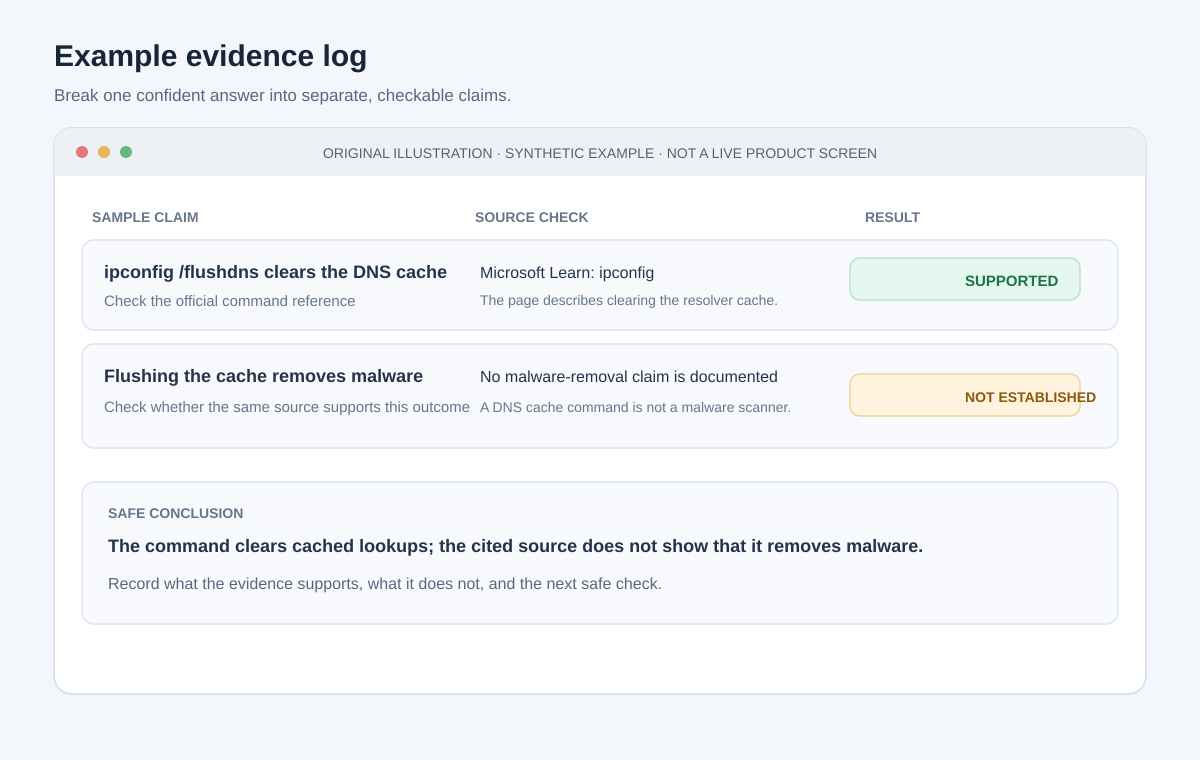
Illustrative mock screen with fictional content, not a screenshot of a live product.
The log is especially helpful when the answer is passed to another person. They can see which part is verified and where your evidence stops, rather than inheriting the chatbot's confidence.
When AI Provides Citations
Citations are leads, not proof. A generated answer can include a real link that does not support its sentence, a valid article with an outdated detail, or a reference that is difficult to find. Check each link yourself.
For every consequential citation, compare the answer with the cited passage. Look for changes in wording such as “may” becoming “will,” an example becoming a universal rule, or a result from one context being presented as if it applied everywhere. If a link is broken, search for the title on the publisher's site rather than accepting a replacement suggested by the model without checking it.
If there is no source, ask the model to identify the exact claim and suggest what kind of original evidence would answer it. Then do that search independently. Asking the same model to “double-check” can help reveal assumptions, but it does not create independent evidence.
Match the Review to the Consequence
| Situation | A sensible check |
|---|---|
| Brainstorming or fictional drafting | Check names and factual details before publishing; otherwise, use the output as a starting point. |
| Routine explanation or summary | Compare the important points with the original document and look for omitted caveats. |
| Software setting or troubleshooting step | Check current vendor documentation, confirm the platform/version, and avoid risky changes until you understand how to undo them. |
| Purchase or business recommendation | Verify current pricing, limits, and terms; compare options using criteria that matter to your case. |
| Health, legal, financial, or safety decision | Use authoritative sources and a qualified professional where appropriate. Do not treat a chatbot as the final decision-maker. |
The National Institute of Standards and Technology's Generative AI Profile discusses risks and risk-management approaches for generative AI systems. It is useful background for organizations, but it does not certify a particular chatbot answer or replace checking the evidence for your specific claim.
Test Technical Advice Safely
When an answer includes code, commands, or configuration changes, use a test that can catch the relevant failure without putting important data or accounts at risk:
- Confirm the software version and operating system the instructions apply to.
- Read the official documentation for each command or setting.
- Try the steps in a disposable project, test account, or non-critical device when possible.
- Check the actual result, including error messages and relevant logs.
- Test a failure or edge case and make sure you can restore the previous state.
“It ran once” is not the same as “it is correct, safe, or appropriate here.” If the advice affects security, backups, permissions, or production systems, get a qualified person to review it before acting.
Keep Private Information Out of the Verification Loop
Verification may involve pasting the answer into another AI service or uploading a document. That can expose the very material you are trying to check. Remove personal, client, or confidential information first, and use only tools approved for that data. Our AI privacy guide explains what to consider before sharing prompts and files.
You can ask a model to identify claims without giving it sensitive context. For example:
“List the factual claims in this text and what kind of source could verify each one. Do not infer missing details. I will check the sources separately.”
That prompt organizes your research; it does not verify the claims by itself.
A Reusable Prompt for Planning a Check
Use this to get a verification plan, not a verdict:
Break this answer into individual factual claims. For each claim, state what evidence would be needed, what assumptions or missing context may affect it, and which claims could cause harm or a bad decision if wrong. Do not say a claim is verified unless you provide a source passage that directly supports it. I will open and check the sources myself.
Then independently inspect the evidence. If the tool cannot provide a reliable source, keep the claim marked as unverified rather than filling the gap with a second generated explanation.
If You Find an Error
Correct the decision or document first. If you shared the answer, tell the recipients which statement was wrong and what evidence changed the conclusion. For repeat work, update your checklist or source material so the same failure is less likely next time.
If the error came from a summary, compare the summary against the original. If it came from an instruction, check whether you tested an unsafe or outdated step. If it came from a citation, record whether the source was absent, irrelevant, or misread. The aim is not to prove that AI is unreliable; it is to improve the point in your process where evidence should have been checked.
Bottom Line
AI can help you find questions to investigate, organize a long answer, and draft a first pass. It cannot make a claim true by phrasing it confidently or attaching a link.
Before relying on a consequential answer:
- Separate it into testable claims.
- Find an original source or a safe, relevant test.
- Check that the evidence supports the exact claim and scope.
- Record what remains uncertain.
- Get qualified human review when the consequences call for it.
That small evidence trail turns a fluent answer into something you can responsibly evaluate.
Sources and Further Reading
- Microsoft Learn:
ipconfigcommand reference — documents what/flushdnsdoes. - NIST AI 600-1: Artificial Intelligence Risk Management Framework — Generative Artificial Intelligence Profile — risk-management background for generative AI.
- How to use AI chatbots effectively — prompting and review practices.