
A Better Relationship With Technology Is Not an All-or-Nothing Project
You pick up your phone to check a delivery time. A message appears; you answer it, tap a notification, and look up several minutes later with no idea why you opened the screen in the first place. That small detour can happen to almost anyone. The useful response is not to condemn yourself or throw every device in a drawer. It is to notice what happened and decide whether you want to change the conditions that made it easy.
Technology is part of ordinary life: work, education, banking, maps, health appointments, entertainment, and relationships all run through it. The same phone can help you call a friend, listen to an audiobook, navigate home, and lose half an hour to a feed you did not intend to open. Counting those activities as identical “screen time” hides more than it explains.
Digital wellbeing is the practice of making technology serve your actual priorities. That includes attention and rest, but also convenience, safety, accessibility, social connection, and the demands of work or care. The goal is not a perfect low-screen lifestyle. The goal is to have more say over how technology fits into yours.
This guide offers a nonjudgmental way to assess your habits, tune your devices, create boundaries that work in real life, and revisit the plan when it does not. It is general information, not diagnosis or treatment. If a digital habit is causing serious distress or interfering with daily functioning, a qualified health professional can help you consider what is going on.
Start With the Life You Want, Not a Screen-Time Score
Built-in screen-time dashboards can show which apps were open and when, but they do not explain whether that time was useful, enjoyable, required, or frustrating. A video call with your family and an hour of work are not equivalent to scrolling past your bedtime simply because all three involve a display.
Before setting limits, ask what you want more room for. Perhaps you want to finish a work task without checking messages, be less rushed at bedtime, feel present during dinner, make time for a walk, or stop checking a news feed when you already feel overloaded. A goal tied to your own life gives you a reason to make a change; “use my phone less” usually does not.
For three ordinary days, notice a few screen moments without trying to fix them. Keep the notes short:
| Moment | What I opened | What I meant to do | How I felt afterward |
|---|---|---|---|
| Waiting for the bus | Social feed | Fill a short wait | Entertained, then restless |
| Before bed | News app | Check one headline | Kept reading, went to bed later |
| Lunch break | Video call | Catch up with a friend | Connected and glad I called |
You do not need to record every tap or judge yourself. Look for repeated patterns: a specific time, place, feeling, or notification that tends to lead to use you did not choose. Notice positive patterns too. If a messaging app helps you keep a meaningful connection, the answer may be to keep that use while changing a different one.
Then choose one outcome you would like to improve, such as “I want the last half hour before bed to feel calmer” or “I want to finish lunch without work messages.” Keep the goal about an experience or activity, not a number you can optimize just for its own sake.
Understand the Loop That Pulls You Back In
Many apps are designed to make the next action immediate: a badge promises something new, an autoplay feature removes the stopping point, and an infinite feed keeps supplying another item. Those patterns are convenient when you deliberately want to keep browsing. They are less helpful when you opened the app to do one brief thing and the intended exit is unclear.
A simple way to change a habit is to look at four parts:
- Cue: what reminds or prompts you to check? It may be an alert, a quiet moment, a difficult task, a habit of unlocking your phone, or anxiety about missing an update.
- Action: what do you do next? Open a particular app, refresh a feed, switch between messages, or check several apps in sequence?
- Payoff: what does the action provide in the moment? Information, entertainment, reassurance, connection, stimulation, or a break from an uncomfortable task?
- After-effect: what happens afterward? You may feel informed or connected—or behind, distracted, overstimulated, or annoyed that you continued longer than intended.
This is an observation tool, not a diagnosis. The payoff may be genuinely valuable, even if the timing is not. If a check helps you feel connected, try moving it to a chosen moment instead of treating all connection as a problem. If you open a feed when a task feels difficult, an easier first step might be to write the next action on paper and work for five minutes.
You can also make a useful action easier rather than only blocking an unwanted one. Leave a book near the bed, put walking shoes beside the door, or place the person you want to call on your favorites list. A balanced design gives the desired activity a clear path too.
Tune Notifications Without Cutting Yourself Off
Notifications are interruptions delivered on someone else's schedule. Some are valuable: a family member's call, a calendar reminder, a security alert, or a message needed for work. Many others are promotions, recommendations, activity reminders, or notices that can wait until you choose to open the app.
Do a short notification audit:
- Open the system notification settings and review apps one by one.
- Turn off alerts that rarely need immediate attention, especially promotional, shopping, game, and “someone posted” notices.
- Keep alerts that support safety, access, a necessary responsibility, or a relationship you want to prioritize.
- Where available, use a summary or scheduled delivery for lower-priority updates rather than receiving each one as it arrives.
- Remove badges and sounds that create urgency without adding useful information.
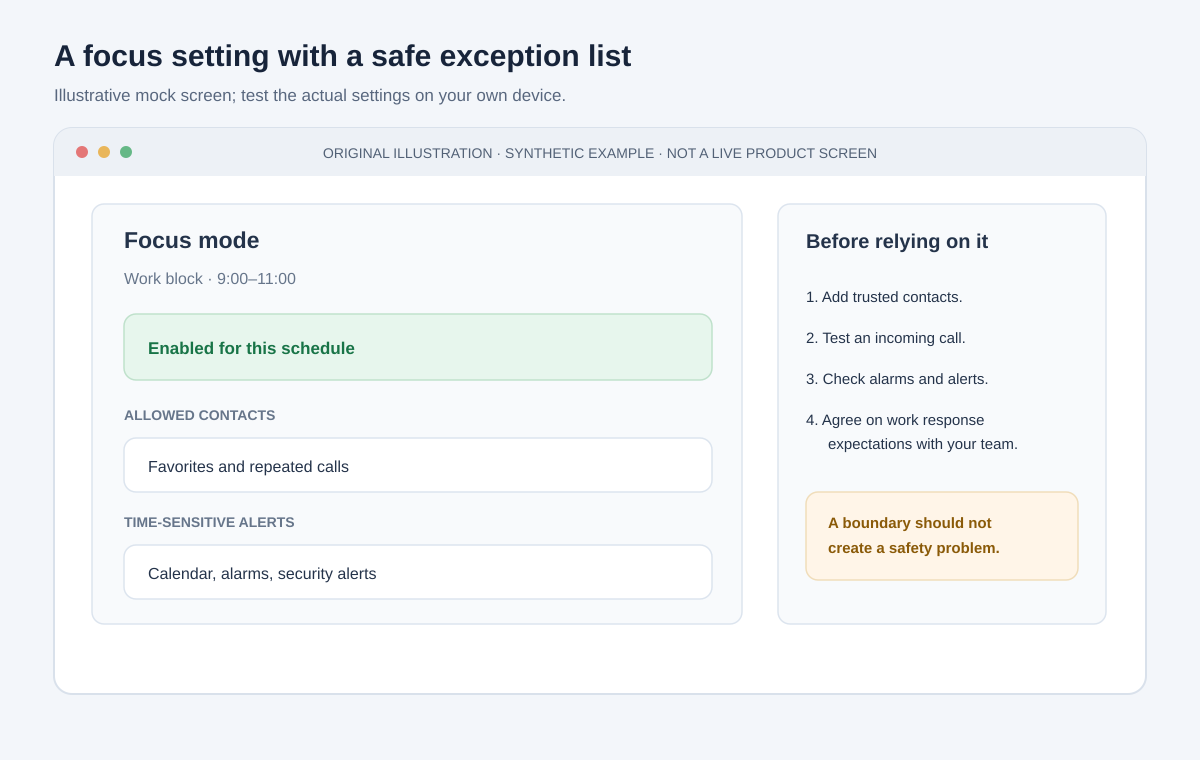
Original mock screen; settings names and emergency behavior vary by device. Test your own configuration.
If your phone has a focus or do-not-disturb mode, make an exception list for important people and time-sensitive contacts. Test it before relying on it: ask a trusted person to call, check repeated-call behavior, and confirm that alarms and emergency alerts work as you expect. A boundary should not create a new safety problem.
At work, device settings cannot replace team agreements. If people expect instant responses, muting every channel may simply move the stress elsewhere. Discuss reasonable response windows, identify the true urgent channel, and batch routine messages where your role permits it. Our focus strategies guide has practical approaches for protecting concentration without pretending meetings and colleagues do not exist.
Make the Phone Less Automatic to Open
When the phone is in your hand and every tempting app is one tap away, a momentary impulse takes almost no effort. Add a little friction to the habits you want to do less automatically:
- Move the most distracting apps off the home screen or into a folder.
- Log out of an app that you only want to use deliberately.
- Remove saved shortcuts that launch a feed before you have chosen what to view.
- Turn off autoplay where the service gives you that option.
- Use the web version instead of the app if it better matches your intended use.
- Put the phone in a bag, drawer, or another room during an agreed focus period—if you do not need it for safety, accessibility, or work.
These changes are not tests of character. They make the default action slightly less automatic and give you a moment to choose. If a restriction makes an important task harder, undo it or redesign it. A useful boundary supports your life; it does not turn ordinary tools into an obstacle course.
Consider setting up your home screen for actions you value: maps, transit, calendar, camera, accessibility tools, messages from key people, and the utilities you genuinely use. You can keep entertaining apps available without giving them the most prominent place.
Protect Sleep With a Repeatable Wind-Down
Phones can keep you engaged late, deliver a message after you have settled, or make it easy to keep reading when you intended to sleep. For some people, using a device near bedtime is not an issue; for others, it pushes bedtime later or interrupts rest. Pay attention to your experience instead of assuming one rule fits everyone.
The CDC lists turning off electronic devices at least 30 minutes before bedtime among habits that can improve sleep. You can try that as an experiment, not a moral standard:
- Choose a realistic time to stop active browsing before bed.
- Put the phone on a charger outside arm's reach, or leave it outside the bedroom if that works for your household.
- If you rely on it for an alarm, emergency access, or accessibility, keep it available but set a quieter display and alert configuration.
- Replace the last scroll with something that helps you wind down: reading, gentle stretching, preparing for tomorrow, or listening to audio with the screen off.
- If a message or on-call duty must reach you, configure exceptions rather than pretending you can disconnect completely.
Night modes and warmer display settings may make a screen more comfortable, but they do not prevent an engaging app from keeping you awake or a notification from interrupting you. Think about both light and behavior: what you are viewing, how long it tends to continue, and whether the device can reach you after you put it down.
Sleep needs vary. The CDC publishes age-specific sleep recommendations and advises talking with a healthcare provider about ongoing sleep problems. This article cannot determine why someone is sleeping poorly. If difficulties persist, or if tiredness is affecting daily life, consider asking a qualified professional rather than treating an app setting as a medical solution.
Balance Sitting With Movement and Time Away From the Desk
Digital tools often bring more activity into a seated position: work, study, entertainment, shopping, and socializing can all happen on the same device. That does not make screens inherently bad, and not everyone has the same mobility or health circumstances. It does make it useful to notice when a screen-filled day has left little room for movement or a change of setting.
The World Health Organization notes that physical activity includes movement during leisure, transport, work, and household tasks. The CDC's adult guidelines recommend at least 150 minutes of moderate-intensity aerobic activity a week and muscle-strengthening activity on two or more days, while emphasizing that some activity is better than none. Those are population guidelines, not a personalized exercise prescription.
For digital wellbeing, start with practical opportunities that fit your circumstances:
- Stand, stretch, or change posture between tasks if that is comfortable and possible for you.
- Take a short walk during an audio call when appropriate.
- Put a regular break on the calendar after a long seated work block.
- Choose an offline activity you enjoy, rather than making movement a penalty for screen use.
- Use an alarm, calendar reminder, or watch if it helps you remember to pause; do not add an elaborate tracking system unless it is genuinely helpful.
Some people use screens for work, communication, mobility support, pain management, or social connection. There is no need to judge those uses against an idealized screen-free day. Adapt the idea of a break to your body, environment, access, and responsibilities.
Be Present With Other People—By Agreement, Not by Policing
Phones can help people stay close across distance, coordinate care, share photos, and take part in communities they cannot access in person. They can also compete with a conversation when alerts repeatedly pull attention away. The distinction is not “online relationships are fake” versus “offline relationships are real.” It is whether the people involved feel respected and connected in that moment.
Try making expectations explicit rather than enforcing a blanket phone ban:
- Agree that meals or a particular conversation are phone-down time, while allowing exceptions for caregiving, accessibility, or urgent needs.
- Tell friends or family when you will be unavailable and when you will check messages again.
- Put the phone face down or out of reach during a conversation if both people are comfortable with that.
- Share photos or updates intentionally, then return attention to the activity rather than feeling obliged to document everything.
- Keep a way for important contacts to reach you when a focus setting is active.
In shared spaces, rules work best when they are mutual. If everyone is asked to put phones away except the person setting the rule, it can feel less like connection and more like control. A small agreement—such as one meal without feeds—can be more sustainable than an all-day restriction.
Set Up Work and Study Boundaries That Match Your Role
Not everyone can ignore work messages after hours. Some people are on call, work across time zones, care for others, or rely on a phone for job access. “Just disconnect” is not helpful advice if the real issue is a workload or expectation you cannot control alone.
Instead, identify the boundaries available to you:
- Separate channels: use a work profile, account, or device mode if your employer supports it.
- Make availability visible: update your status or schedule so colleagues know when to expect a response.
- Define urgency: agree on what deserves a call or urgent alert versus a message that can wait.
- Create a finish line: write down the next task for tomorrow, close work tabs, and silence only the channels you are authorized to silence.
- Use focused sessions: choose a specific outcome for a block, and temporarily pause low-priority inputs if your role allows it.
Students can use a similar pattern. Put the materials needed for one task in reach, decide how to handle messages during study time, and take a short planned break rather than opening an endless feed whenever a problem becomes difficult. Our deep work guide and AI study guide offer additional practical ideas for concentration and learning.
If the boundary problem is a team-wide expectation, a phone setting may provide a temporary buffer but not a lasting fix. Raise the issue with a manager, instructor, or trusted colleague where it is safe and appropriate.
Family Digital Wellbeing: Make a Plan Together
For children and teenagers, advice depends on age, development, content, context, and the individual child. A single hour limit cannot describe every family's needs. Caregivers can still establish predictable routines and talk about what media is for, what feels uncomfortable, and how to get help.
The American Academy of Pediatrics offers a customizable Family Media Plan. Consider using a family discussion to agree on:
- Times or places when devices are put aside, such as a shared meal or a bedtime routine.
- Which devices stay in bedrooms overnight, taking age, safety, and accessibility needs into account.
- How family members can contact one another in an urgent situation.
- How to handle group chats, strangers, personal information, and upsetting or harmful content.
- What adults will model themselves, since rules are easier to accept when they apply consistently.
- How the plan changes as a child gains independence and demonstrates new needs or responsibilities.
Invite children to help shape rules where appropriate. Ask what they enjoy online and what makes them feel pressured or upset. Explain that they can come to a trusted adult if something goes wrong without assuming that every problem will lead to losing all device access. That openness makes it more likely that a child will ask for help early.
Parental-control tools can support a family agreement, but they cannot replace conversation, supervision appropriate to a child's age, or trust. Review settings with the child where practical, explain what is monitored, and avoid covert surveillance as a substitute for a relationship. For individual concerns about sleep, mood, development, or safety, speak with a pediatrician or another qualified professional.
A Two-Week Digital Wellbeing Reset
You do not need a dramatic “digital detox.” Try this two-week experiment to learn which changes help. Keep the experiment small enough that it can survive a busy day.
Days 1–3: Notice without judging
Use the short moment table from the start of this article. Record a few unplanned checks, the activity that felt worthwhile, and any time a screen interfered with something you wanted to do. Turn off a notification only if you already know it is unnecessary; otherwise, observe first.
Days 4–5: Pick one priority
Choose one outcome: a calmer bedtime, fewer interruptions during a study block, more attention during meals, or a regular walk. Write a sentence that describes the change. Example: “After 9:30 p.m., I want my phone to help with the alarm and family calls, not invite me into news and video feeds.”
Days 6–8: Change the environment
Use the lightest intervention likely to help. Silence one category of notification, move one app, switch off autoplay, set a focus schedule, or charge the phone farther from the bed. Tell other people about a change if they depend on your availability. Test exceptions before you rely on them.
Days 9–11: Add a replacement
Decide what you will do instead at the moment the old habit usually appears. Keep a book nearby, set out something for a hobby, plan a short walk, or write down the first step of a task. If the phone was meeting a real need for connection or comfort, choose another way to meet that need rather than simply removing it.
Days 12–14: Review and adjust
Ask three questions:
- Did the change help with the outcome I chose?
- What became inconvenient, stressful, or less accessible?
- Should I keep it, modify it, or stop the experiment?
Keep only what works. If a setting created missed messages or made it harder to use an accessibility tool, adjust the exception list or choose a different approach. A reset is not a competition and has no pass/fail score. You have learned something useful even if the answer is “this boundary does not fit my life.”
Choose Tools That Help Without Adding More Noise
Digital-wellbeing tools can show app use, set focus schedules, limit access, or summarize notifications. They can be useful, but installing another app may add another dashboard, alert, account, or source of personal data.
Before installing one, ask:
- Can the operating system already do this?
- What information does the app collect, and does it need an account?
- Can you set exceptions for important people and accessibility features?
- Can you pause or remove the restriction easily?
- Does it support the behavior you want, or merely give you another score to monitor?
- Does using it make you feel more in control—or more guilty and preoccupied?
Built-in tools are a reasonable first try: notification settings, scheduled focus modes, bedtime routines, app timers, and grayscale may be available on your device. Names and behavior vary by operating system and version, so check your device's current documentation and test any schedule before depending on it. Our privacy guide can help you think through the data access of apps you install.
Avoid treating a timer as an enforcement mechanism for every situation. An app limit might be useful for a feed you tend to overuse, but a rigid block can disrupt a work task, a supportive community, or an important conversation. Prefer tools you control, with clear exceptions and an easy way to revise them.
Troubleshooting: When a Boundary Does Not Stick
“I turned off notifications, but I keep checking anyway.”
The alert may not be the main cue. Notice where you are and what happens just before the check. You might be seeking a break, reassurance, stimulation, or a way to avoid a difficult next step. Address that need directly: take a short break, write the next action down, or set a chosen time to check messages.
“My phone is essential for work.”
Keep the tools and alerts your job requires. See whether you can separate urgent contact from routine updates, agree on response expectations, or set different focus profiles for work and personal time. If you cannot choose your availability alone, discuss the expectation with your team rather than blaming yourself for needing a device.
“The phone is my main way to connect with people.”
Connection is a valid use. If certain feeds or times leave you feeling worse, keep direct messages, calls, and communities that support you while changing the part that is not working. Try a call, a scheduled group chat, or a smaller set of trusted accounts—not because online contact is inferior, but because you get to choose what kind of contact you want.
“I broke my own rule.”
Treat it as information. Was the rule vague, inconvenient, too strict, or poorly matched to a difficult day? A boundary such as “use the phone less” has no clear next action. Try “put the phone in my bag during lunch, except for a call from my caregiver,” and review whether that is realistic.
“Tracking my habits makes me more anxious.”
Stop tracking. The data is a tool, not an obligation. You can use one qualitative observation—“I slept later on nights when I kept reading in bed”—or ask a trusted person what they notice. If the worry feels overwhelming or persistent, consider speaking with a qualified health professional.
The Bottom Line: Make Technology More Intentional, Not Perfect
A healthier relationship with technology is not measured by how few hours you spend on a screen, how many apps you delete, or whether you can ignore every message. It is measured by whether your devices help you do the things you value—and whether you can change the parts that repeatedly get in their way.
Start with one moment you would like to improve. Observe the cue, make one small change to the environment, and decide what you will do instead. Keep the parts of technology that support connection, work, access, and joy. Review your boundary after trying it in a real week, and adjust it to fit the life you actually have.
Progress can look like fewer interruptions, an easier bedtime, a more present conversation, or simply feeling that you chose how to spend the last half hour. You do not need to disconnect from modern life to have more agency in it.
Sources and Further Reading
- CDC: About Sleep — sleep habits, age-specific recommendations, and when to talk with a healthcare provider.
- CDC: Adult Physical Activity Guidelines — current general recommendations for adults and the reminder that some movement is better than none.
- World Health Organization: Physical Activity — definitions, benefits, and information on sedentary behavior.
- American Academy of Pediatrics: Family Media Plan — a customizable family tool for making media agreements.